Check how a page unfurls
The OG preview shows the card a link to any page gets on Facebook, X, Slack, Discord, LinkedIn and KakaoTalk, before you share it. It works for any public page, whether or not it uses Mocco's images.
Run a preview
In your workspace, open Developers → OG preview.
Enter the page's address (
https://is added if you leave it out) and choose Preview.
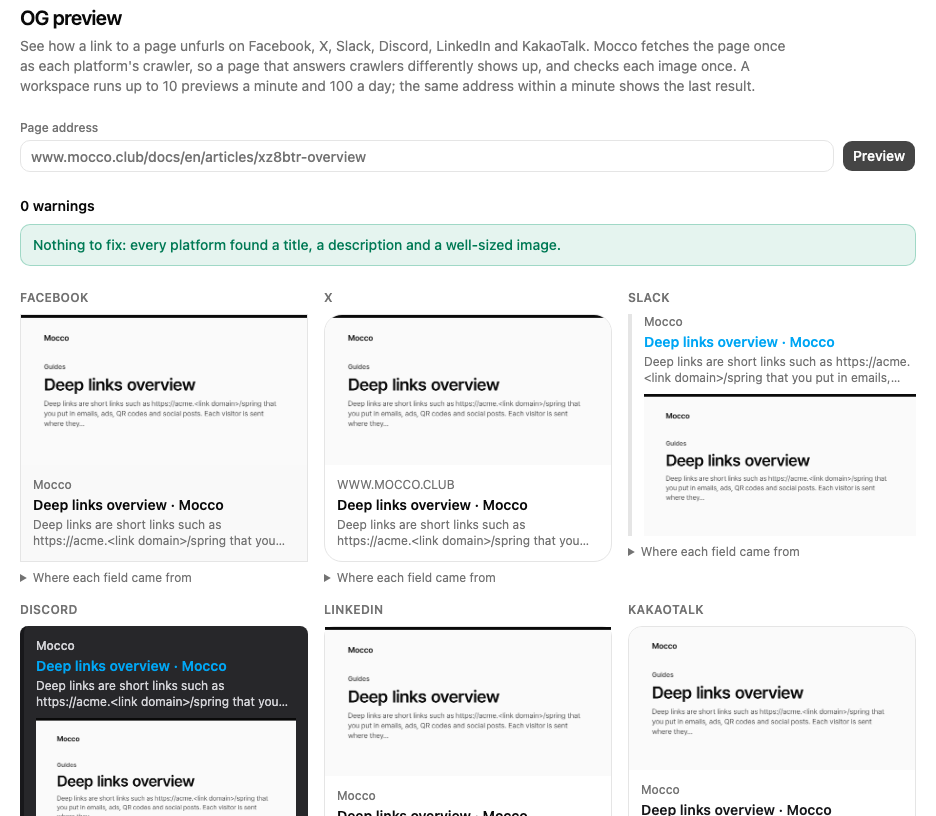
Mocco fetches the page once as each platform's crawler, with that crawler's own user agent, so a page that answers crawlers differently shows up. Each card is built from the tags that platform reads, in the order it falls back through them; Where each field came from names the tag each title, description and image came from. Images lists every image with its size in pixels and kilobytes.
The cards are likenesses for checking length, crop and fallbacks, not copies of each app, and the platforms change their rules without notice.
Warnings
| Warning | What to do |
|---|---|
| No image, or the image can't be loaded | Add an og:image tag with a URL that loads publicly. |
Relative or http:// image URL | Use an absolute https:// URL. |
| No image size tags | Add og:image:width and og:image:height, so apps can lay out the card before the image loads. |
| Image over 1 MB | Make the image smaller; some apps skip large images. |
| Image not close to 1.91:1 | Use 1200×630 (Mocco's cards already are). |
| KakaoTalk crops more than 10% | KakaoTalk shows images at 2:1; keep the important part in the middle. |
| Crawlers got different answers | Your page or its CDN answers some crawlers differently (another status, title, description or image); check bot rules and caching. |
| Page can't be read | The page didn't load for the crawlers; the warning says why. |
| No title or description | Add og:title and og:description (or at least <title> and the meta description). |
Limits
A workspace can run 10 previews a minute and 100 a day, shared by everyone in it and by agents. Previewing the same address again within a minute shows the last result and doesn't count. Mocco only fetches public addresses on the usual web ports, follows at most 3 redirects, and gives up after 5 seconds or on a page over 1 MB or an image over 5 MB.
From an agent
The MCP tool mocco_og_preview runs the same preview and reports the same cards, images and warnings. It changes nothing, so it doesn't ask for confirmation, and it shares the workspace's limits. See Connect Mocco to your agent.