Sign image URLs
An OG image URL looks like this:
https://api.mocco.club/v1/og/<project id>/article.png?brand=Acme%20Docs&title=Install%20in%20five%20minutes&s=<signature>The fields are query parameters and s is the signature. Put the whole URL in your page's og:image (and twitter:image) tag. No API key is needed to load it: the signature is the credential.
First generate the project's signing secret (see The signing secret).
In the console
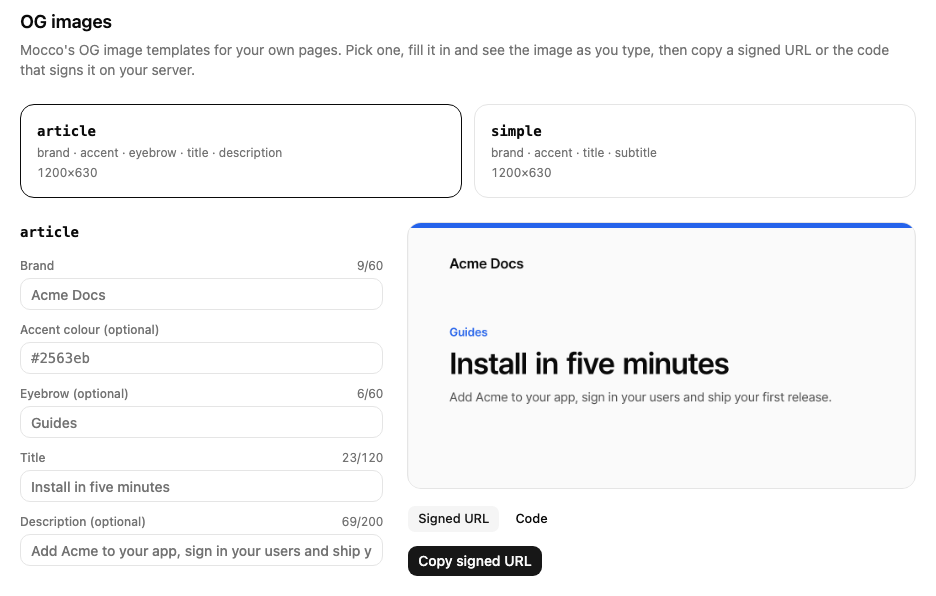
Open your project, go to API keys and choose Open the template gallery on the OG image signing card. Every member can use the OG images page.
Choose a template. The form shows its fields; Brand starts as your project's name, and Accent colour as your help center's accent when you have one.
Fill in the fields. The preview redraws as you type, and a field that is too long or empty when it's required says so before anything is sent.
Choose Copy signed URL, or switch to the Code tab for an
@mocco/nodesnippet with the current values.
Without a secret, the page says so: owners and admins get a link to generate it, and other members see who can.
The preview isn't stored and doesn't count against your project's image limit, but each person can render 30 previews a minute.
On your server with @mocco/node
import { createOgSigner } from '@mocco/node';

const og = createOgSigner({
  projectId: process.env.MOCCO_PROJECT_ID,
  secret: process.env.MOCCO_OG_SECRET,
});

const image = og.url({
  template: 'article',
  params: { brand: 'Acme Docs', eyebrow: 'Guides', title: 'Install in five minutes' },
});
// https://api.mocco.club/v1/og/<project id>/article.png?…&s=…
Signing happens on your server with no network call, so you can do it while rendering each page or at build time. If you already use createMoccoServer, pass og: { projectId, secret } to it and call server.og.url(…) instead. Fields you set to undefined are left out. The signer only checks the secret and the project id; Mocco checks the fields when the image is loaded.
In any other language
Build the signature yourself:
Take every field except
s, sort them by name, and join them asname=valuepairs with&, encoding each name and value as JavaScript'sencodeURIComponentdoes.Make the string
/v1/og/<project id>/<template>.png?<the joined fields>. Use this path even if your Mocco API is served under another host or prefix.Compute HMAC-SHA256 of that string, keyed by the secret (the 64-character string as UTF-8), encode it as base64url and keep the first 32 characters. That is
s.Add
&s=<signature>to the URL. The order of the parameters in the final URL doesn't matter.
import { createHmac } from 'node:crypto';

function ogImageUrl(projectId, template, fields, secret) {
  const path = `/v1/og/${projectId}/${template}.png`;
  const query = Object.keys(fields)
    .sort()
    .map(name => `${encodeURIComponent(name)}=${encodeURIComponent(fields[name])}`)
    .join('&');
  const s = createHmac('sha256', secret).update(`${path}?${query}`).digest('base64url').slice(0, 32);
  return `https://api.mocco.club${path}?${query}&s=${s}`;
}
What Mocco answers
| Situation | Answer |
|---|---|
| An unknown template, or a project without a signing secret | 404 |
| No signature, or one that doesn't match (signed with another project's secret or a rotated one) | 401 |
A required field missing, a field the template doesn't take, a value over its limit or a bad accent | 400, naming the field |
| More than 60 new renders a minute for your project | 429, with Retry-After |
| Otherwise | The PNG image, cached for a day |
Only new renders count toward the 60 a minute: once an image has been rendered, loading the same URL again is served from storage. To make sure no crawler ever waits for a render, pre-render your images from CI.
Changing a field changes the URL, and so the image. That is also how you refresh a card that KakaoTalk or another app has already cached: they never fetch the old URL again.