
Notifications overview
Mocco posts the events your team cares about to Discord. Some events come from Mocco itself, like a deploy gate waiting for approval. Others come from the tools you already use: Sentry, Vercel and GitHub send them to Mocco as webhooks, and Mocco forwards the ones you ask for.
Open a workspace and choose Notifications in the left menu. The page has three tabs:
| Tab | What it is for |
|---|---|
| Channels | Connect Discord, choose the channels Mocco posts to, and decide which events each channel gets (its rules). |
| Sources | Connect Sentry, Vercel or GitHub. Each source has its own ingest URL and signing secret. |
| Activity | Every event Mocco received or produced, and what happened to it in each channel. Use it to answer "why didn't it arrive?". |
Owners and admins of the workspace can change everything. Members can see all three tabs but cannot change anything.
How an event travels
A tool sends a webhook to the source's ingest URL, or Mocco produces one of its own events.
Mocco checks the signature and records the delivery. It shows up in Activity.
Mocco turns it into an event, such as
vercel.deployment.errororgate.pending.Each active channel with a rule that matches the event gets a message. A channel with no matching rule gets nothing, and Activity tells you why its rules did not match.
Messages are sent in the background. If Discord is busy or rate limits the bot, Mocco waits and tries again. The message may arrive a little later, but it is not dropped.
Set it up in this order
Connect Discord and add at least one channel.
Add rules to the channel. The quickest way is a preset: Mocco for your own deploy events, or Sentry, Vercel or GitHub for a source.
Check Activity after the first event arrives.
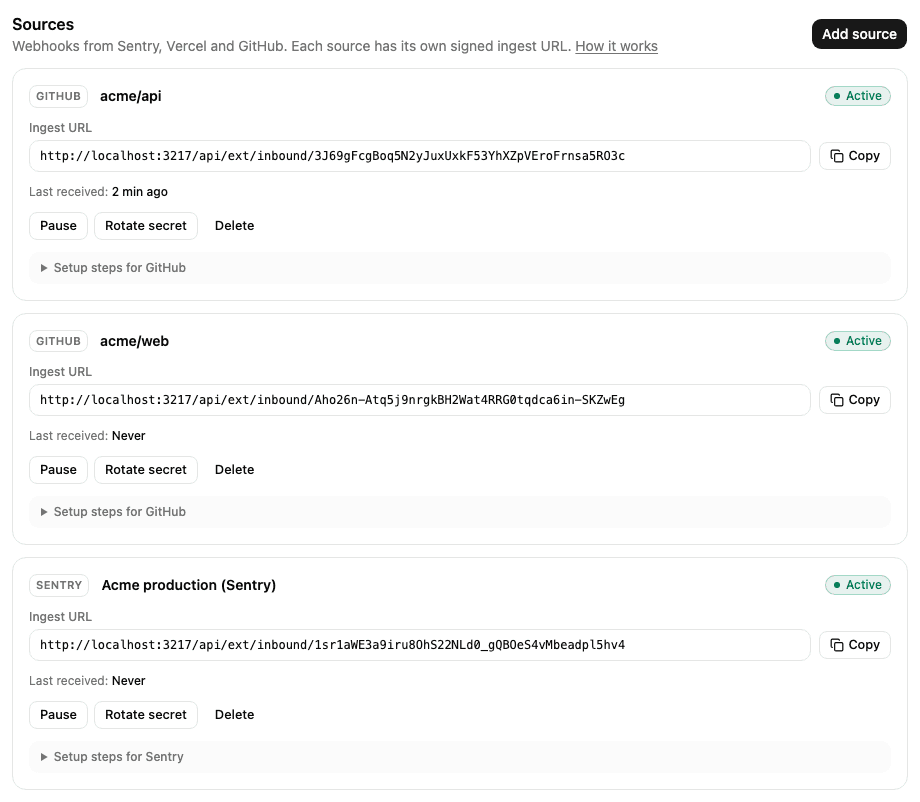
Each source on the Sources tab shows its Ingest URL (with Copy), when it last received a delivery, and the actions Pause / Resume, Rotate secret and Delete. Pausing a source makes Mocco refuse its deliveries until you resume it; deleting it also deletes its activity. Setup steps on each source links to its guide.
Mocco events lists the events Mocco produces on its own. When something does not show up, see Troubleshooting.
Limits
A workspace can forward 5,000 events a day from its sources. Past that, deliveries are still recorded but not forwarded (outcome
over_quota). The limit is approximate: a burst can go a little over it.Past 20,000 deliveries in 24 hours, Mocco refuses new ones with HTTP
429and records nothing, to protect the service.A webhook body can be at most 1 MB.
Activity is kept for 30 days.