
Connect GitHub
Mocco receives pushes, pull requests, issues, releases and workflow runs from a GitHub repository or organization webhook. For GitHub, Mocco generates the signing secret and you paste it into GitHub.
This is separate from connecting the Mocco GitHub App for deploy governance. A notification source is a plain webhook; you can add one for any repository or organization you administer.
You need to be an owner or admin in Mocco, and an admin of the repository (for a repository webhook) or an owner of the organization (for an organization webhook).
1. Create the source in Mocco
Open Notifications > Sources and click Add source.
Choose GitHub as the Kind and give it a Name, such as
acme/web.Click Create source.
Mocco shows the new secret once. Click Copy and keep it until you have pasted it into GitHub. Mocco will not show it again. If you lose it, click Rotate secret on the source to get a new one (and paste that into GitHub instead).
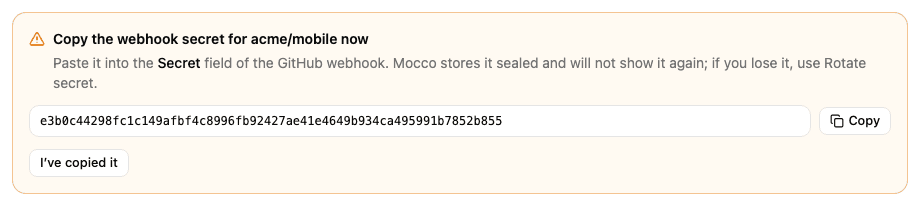
Copy the source's Ingest URL from the list as well.
2. Add the webhook in GitHub
For a repository:
On GitHub, open the repository and click Settings.
In the left sidebar, click Webhooks, then Add webhook.
For an organization: click your profile picture, Your organizations, Settings next to the organization, then Webhooks and Add webhook.
Then fill in the form:
Payload URL: the source's ingest URL from Mocco.
Content type: choose application/json. Mocco cannot read the form-encoded format; those deliveries are recorded as
ignoredwithmalformed JSON body.Secret: paste the secret Mocco generated.
Under "Which events would you like to trigger this webhook?", choose Let me select individual events and select the events you want from this list: pushes (
push), pull requests (pull_request), issues (issues), releases (release) and workflow runs (workflow_run). Other events are recorded asignored.Keep Active selected and click Add webhook.
GitHub sends a ping right away. It appears in Mocco's Activity tab as ignored with the
reason ping, which confirms the URL and the secret are right.
What you get
| GitHub event | Mocco event |
|---|---|
push | github.push |
pull_request opened / reopened | github.pull_request.opened / github.pull_request.reopened |
pull_request closed, merged | github.pull_request.merged |
pull_request closed, not merged | github.pull_request.closed |
issues opened / reopened / closed | github.issues.opened / .reopened / .closed |
release published | github.release.published |
workflow_run completed with failure, timed out or startup failure | github.workflow_run.failed |
workflow_run completed with success | github.workflow_run.succeeded |
any other action or event (pull_request edited, issues labeled, a cancelled run…) | recorded as ignored |
Filter keys:
| Event | Keys |
|---|---|
github.push | repo (acme/web), refType (branch or tag), branch (branch pushes only), hasCommits (true or false) |
github.pull_request.* | repo, baseBranch (the branch the pull request targets) |
github.issues.*, github.release.published | repo |
github.workflow_run.* | repo, workflow (the workflow name), branch |
hasCommits is a true/false value, not text. The GitHub preset adds github.push with
hasCommits = true (so branch deletions and empty pushes stay quiet), the four pull request
events, the three issue events, github.release.published and github.workflow_run.failed.
To only hear about pushes to main, add a rule on github.push with the filter branch=main.
Check that it works
Push a commit to the repository. The push appears in Activity with outcome published.
In GitHub, open the webhook and click Recent deliveries to see the last 3 days of deliveries
and Mocco's answer to each: 202 means Mocco recorded it. If Mocco refused one (for example
401 after a secret mix-up), fix the cause and click Redeliver. Mocco keeps one record per
GitHub delivery ID, so redelivering one it already recorded changes nothing. See
Troubleshooting for the other answers.