
Flags as code
You can keep your feature flags in your repository, next to the code that reads them. Changes to the file go through your usual pull requests, and merging them updates Mocco. Merging is not the same as releasing: environments you protect still wait for their approvers.
1. Connect the repository
The repository must be connected to Mocco through the GitHub App and linked to the project, as for pipelines. Mocco reads the file on every push to the repository's default branch, and on pull requests into it.
2. Add .mocco/flags.yml
version: 1
flags:
  onboarding_v2:
    description: The new onboarding flow
    client_visible: true        # browsers and apps may evaluate it
    targets:
      staging:
        default: on
      production:
        default: off
        rules:
          - when: { attribute: plan, op: in, values: [pro] }
            serve: on
Each flag lists its targets, the environments it is on in (by environment key), with what it serves by default and its rules. A flag is off in every environment the file doesn't list for it. Boolean flags get the variants on and off. Other types list their own:
  checkout_copy:
    type: string
    variants: { short: Pay, long: Pay securely }
    off_variant: short          # what a kill serves
    targets:
      production:
        default: long
        rollout: { short: 50, long: 50 }   # instead of `default`, when no rule matches
A rule's when is one condition or a list that must all match: { attribute, op, values } or { segment }. Its serve is a variant or { rollout: { variant: weight, … } }.
| Field | Where | Meaning |
|---|---|---|
type | flag | boolean (default), string, number or json |
description | flag | Shown in the console |
lifecycle | flag | temporary (default) or permanent; permanent flags aren't suggested for cleanup |
client_visible | flag | true lets browsers and apps evaluate it (default false) |
variants, off_variant | flag | Required unless the flag is boolean |
enabled | target | Default true; false gives callers the default in their code |
default | target | The variant served when no rule matches |
rules | target | Tried in order; the first whose conditions all match serves |
rollout | target | Served instead of default when no rule matches |
The operators are the ones the console's rule editor offers: in, not_in, starts_with, ends_with, lt, lte, gt, gte and the semver_ comparisons. Unknown fields are refused, so a misspelled key is caught instead of ignored.
3. Open a pull request
When a pull request into the default branch changes .mocco/flags.yml, Mocco adds a check to it called Mocco flags plan. It says what merging would do in every project the repository is linked to:
the flags it creates, the ones it takes over from the console, and the ones it hands back;
each environment that changes, with its changes, and whether they apply at once or wait for approval;
if the file has a mistake, each problem with where it is, so you can fix it before merging.
The check is planned against your flags as they are now, so it also shows what someone changed in the console since the branch was made. It runs again on every push to the pull request. It never blocks a merge on its own: it passes when the file is fine and ends neutral when it isn't. Nothing changes in Mocco until you merge.
4. Merge, and approve where it's protected
When the change reaches the default branch:
Unprotected environments update at once.
Protected environments get a change waiting for approval, marked with the commit it came from. A newer push replaces it.
Who can't approve: the change counts as proposed by the person who pushed or merged (the member signed in with that GitHub account) and by the commit's author (the member with that verified email). Neither can approve it.

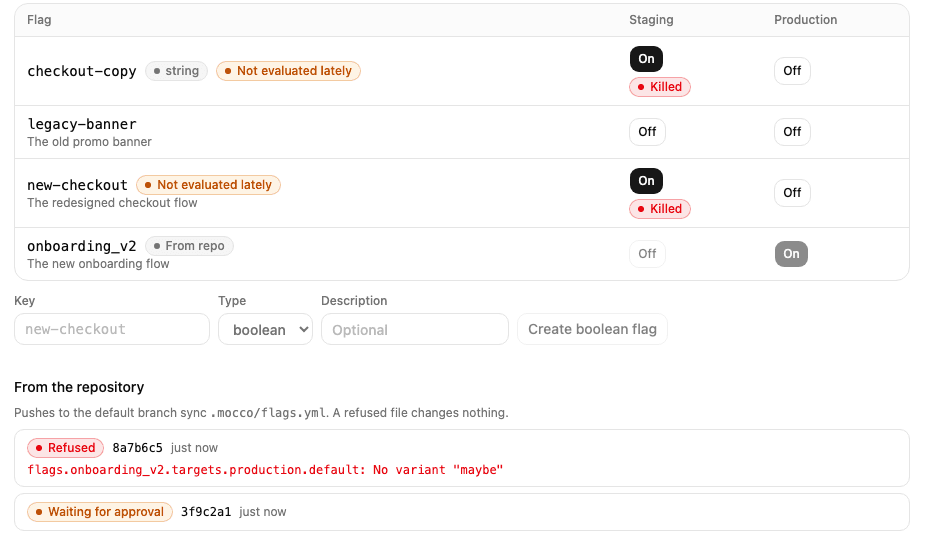
The flags screen marks flags that come from the repository and lists the last syncs. If the file has a mistake, such as an environment that doesn't exist or a variant a flag doesn't have, nothing changes, and the sync shows where the problem is:
In the console
A flag from the repository is read-only in the console: its rules, switches and settings change only through the file. The kill switch still works, because in an incident you shouldn't have to wait for a merge. A sync never undoes a kill: restore the flag in the console once it's safe.
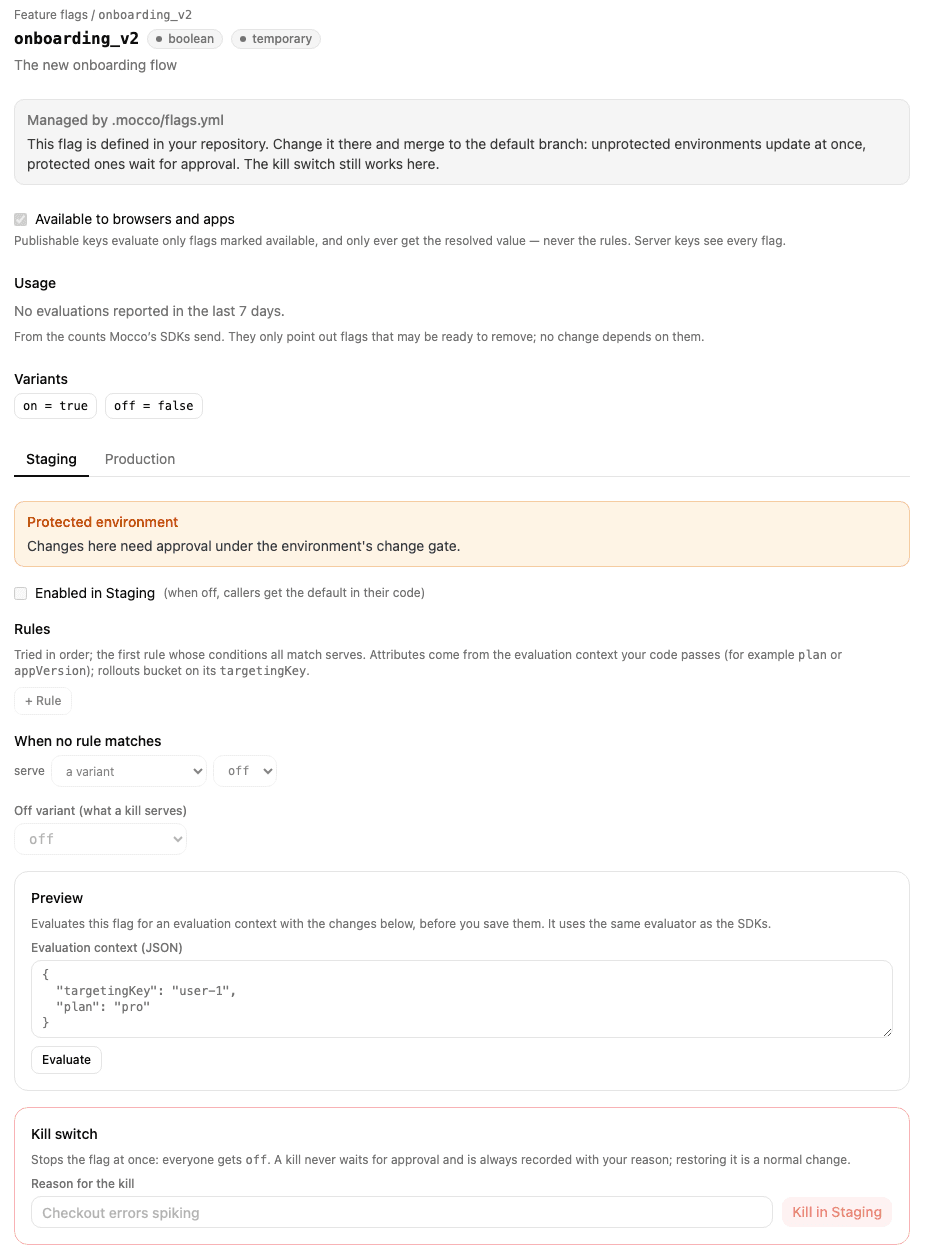
To hand a flag back to the console, remove it from the file. Mocco turns it off everywhere and lets you edit it again. To take over a flag made in the console, add it to the file with the same type and variants. Variants can be added later, but not removed or changed.