
Feature flags in browsers and apps
Code that runs on your users' devices can't hold your flag rules: rules can name customers, internal accounts or plans you haven't announced. In a browser or an app, Mocco evaluates flags itself and sends back only the answers, such as new-checkout = true. Your code still uses the standard OpenFeature API, and Mocco's provider tells it at once when a flag changes.
This guide assumes you have a project with feature flags and an environment, as in the quickstart.
1. Choose which flags devices may see
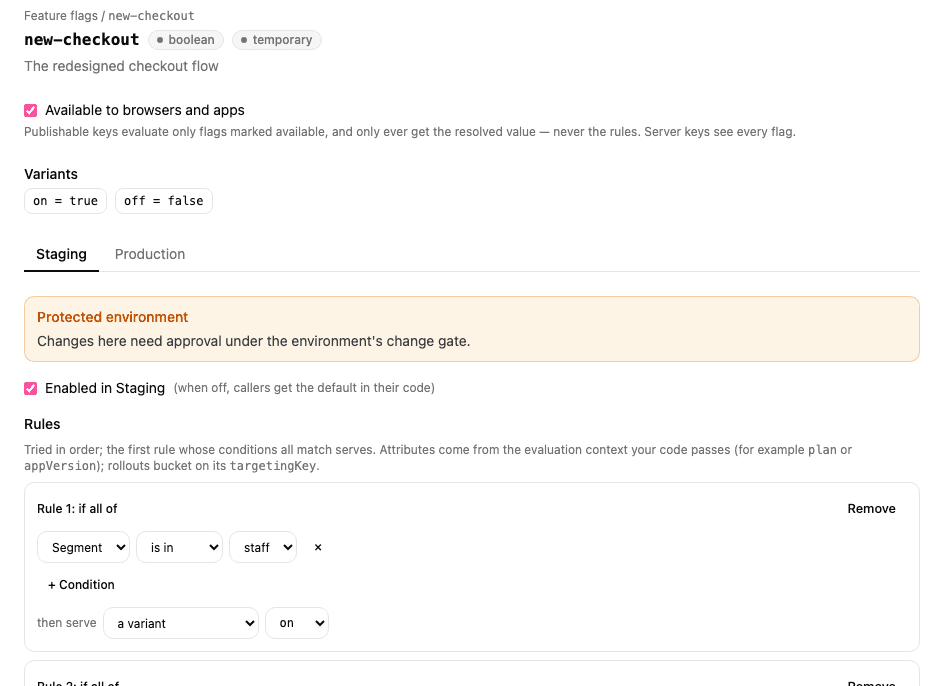
Open a flag and tick Available to browsers and apps. Only flags marked this way are answered for a publishable key; any other flag looks like it doesn't exist (FLAG_NOT_FOUND), so an internal flag's name never reaches a device.
2. Allow your site's origin
A publishable key works on a web page only if the page's origin belongs to one of the project's Web apps. On the project's Overview page, add a Web app (or choose Edit origins on one) and enter each origin your pages are served from, such as https://app.acme.com or http://localhost:5173 for local development. An origin is a scheme and host, with no path.
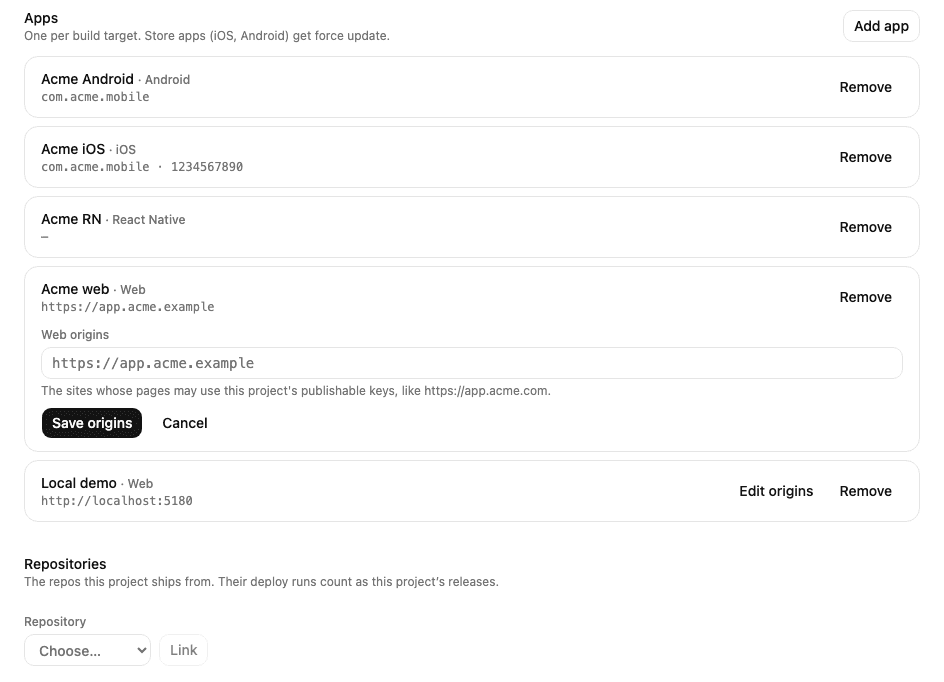
Apps (React Native) don't send an origin, so this step is only for web pages.
3. Create a publishable key for one environment
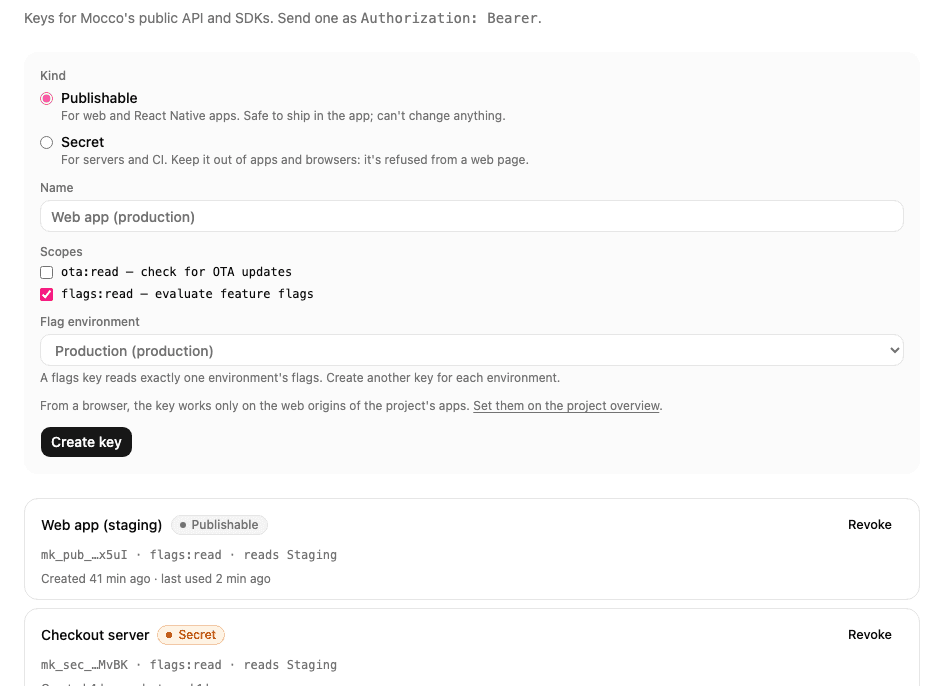
On the API keys page, create a Publishable key with flags:read and choose the environment it reads. Like a server key, it reads exactly one environment, so build each environment of your app with its own key. A publishable key is safe to ship: it can only read the answers for the flags you marked in step 1.
4a. A web page or React app
Install the OpenFeature web SDK and Mocco's web provider:
npm install @openfeature/web-sdk @mocco/openfeature-webRegister the provider once, with the user's context:
import { MoccoWebProvider } from '@mocco/openfeature-web';
import { OpenFeature } from '@openfeature/web-sdk';

await OpenFeature.setContext({ targetingKey: user.id, plan: user.plan });
await OpenFeature.setProviderAndWait(new MoccoWebProvider({ publishableKey: 'mk_pub_…' }));

const showNewCheckout = OpenFeature.getClient().getBooleanValue('new-checkout', false);
Evaluations read the answers the provider already has, so they never wait on the network. The provider fetches all of them in one request and listens to Mocco's change stream: when you change a flag in the console, open pages update within a second or two and OpenFeature emits PROVIDER_CONFIGURATION_CHANGED. If the stream can't connect, it checks every 60 seconds instead (pollInterval). It also checks when the tab becomes visible again, and keeps the last answers in localStorage so a reload shows them before the network answers.
When the user signs in or changes plan, call OpenFeature.setContext(...) again; the provider fetches the answers for the new context.
React
With @openfeature/react-sdk, wrap the app once and read flags with hooks. Components re-render when a flag changes:
import { MoccoWebProvider } from '@mocco/openfeature-web';
import { OpenFeature, OpenFeatureProvider, useBooleanFlagValue } from '@openfeature/react-sdk';

OpenFeature.setProvider(new MoccoWebProvider({ publishableKey: 'mk_pub_…' }));

export function App() {
  return (
    <OpenFeatureProvider>
      <Checkout />
    </OpenFeatureProvider>
  );
}

function Checkout() {
  const isNew = useBooleanFlagValue('new-checkout', false);
  return isNew ? <NewCheckout /> : <OldCheckout />;
}
4b. A React Native app
Install the OpenFeature SDKs, Mocco's React Native provider, and the storage and event-stream libraries it uses:
npm install @openfeature/web-sdk @openfeature/react-sdk @mocco/openfeature-react-native \
  @react-native-async-storage/async-storage react-native-sse
React Native has no localStorage, page visibility or EventSource, so you pass them in:
import AsyncStorage from '@react-native-async-storage/async-storage';
import { MoccoReactNativeProvider } from '@mocco/openfeature-react-native';
import { OpenFeature, OpenFeatureProvider, useBooleanFlagValue } from '@openfeature/react-sdk';
import { AppState } from 'react-native';
import EventSource from 'react-native-sse';

OpenFeature.setProvider(
  new MoccoReactNativeProvider({
    publishableKey: 'mk_pub_…',
    storage: AsyncStorage,
    appState: AppState,
    EventSource,
  }),
);
Then use OpenFeatureProvider and the hooks as in the React example above.
What each piece does:
storagekeeps the last answers on the device. On the next launch the app starts with them straight away, even offline, and refreshes in the background; while Mocco can't be reached the provider reportsPROVIDER_STALEand keeps answering from the stored copy.appStatefetches fresh answers whenever the app comes back to the foreground, and pauses checking in the background.EventSourcelistens to Mocco's change stream while the app is open, so changes arrive within seconds. Without it the provider checks every 60 seconds while the app is active (pollIntervalMs).
Only the very first launch, with nothing stored and no network, starts without answers: every flag then returns your code's default.
Server-side: the Vercel Flags SDK
In a Next.js app that uses the Flags SDK, evaluate on the server with a secret key and Mocco's server provider, through the Flags SDK's OpenFeature adapter:
npm install flags @flags-sdk/openfeature @openfeature/server-sdk @mocco/openfeature-serverimport { createOpenFeatureAdapter } from '@flags-sdk/openfeature';
import { MoccoProvider } from '@mocco/openfeature-server';
import { OpenFeature } from '@openfeature/server-sdk';
import { flag } from 'flags/next';
const mocco = createOpenFeatureAdapter(async () => {
await OpenFeature.setProviderAndWait(new MoccoProvider({ secretKey: process.env.MOCCO_FLAGS_KEY! }));
return OpenFeature.getClient();
});
export const newCheckout = flag<boolean>({
key: 'new-checkout',
defaultValue: false,
adapter: mocco.booleanValue(),
identify: async () => ({ targetingKey: (await currentUser()).id }),
});await newCheckout() in a server component or route then evaluates in memory, as described in the quickstart.