Import a board's history
Moving your Q&A or your update notes from another tool shouldn't cost you the years of history behind them. Mocco reads a folder of Markdown files, one per post, and brings in each post with its comments, images and dates. The same folder format brings update notes into a board's changelog.
You can import from the console or from the command line. Both read the same folder, show you what would happen before anything is written, and are safe to run again.
1. Prepare the folder
Put one Markdown file per post directly in a folder (subfolders aren't read, and README.md files are skipped). A file has a frontmatter, the post's text, and optionally a ## Comments section.
---
title: "Can I change the reminder sound?"
source_url: "https://old-help.example/qna/reminder-sound"
date: "2025.02.04"
author: "Mina"
status: "open"
tags: ["settings"]
comments: 2
---
The reminder plays the same chime every time. Is there a setting for it?
## Comments
### 1. Mina (Feb 5, 2025)
I looked in Settings but couldn't find it.
### 2. Mary (Feb 6, 2025) (accepted)
Open **Settings → Sounds** and pick a reminder sound:
The frontmatter sits between two --- lines, one key: value per line. Text values can be quoted or plain; lists are written like ["a", "b"].
| Key | Meaning |
|---|---|
source_url | Required. The address of the post on the old site. It is the post's identity for re-runs (see below). |
title | Required, up to 200 characters. |
date | Required. When the post was written (see Dates). |
author | The name the old site showed. Optional. |
status | A status of the board's kind: open, answered or closed on a questions board, under_review, planned, in_progress, shipped or closed on an ideas board. Left out, a post with an accepted answer is answered, and any other post takes the board's first status. |
tags | Used by changelog entries (see Import update notes). Ignored for posts. |
comments | How many comments the old site said the post had. Mocco only compares it with what it finds, and warns when they differ. |
The body is Markdown, up to 20,000 characters. Everything between the frontmatter and ## Comments is the post.
The comments follow a line that reads exactly ## Comments. Each one opens with a ### heading with the author and the date, in either form:
### 2. nanami (Feb 4, 2025)
### nanami · 2025-02-04
Add (accepted) at the end of a heading to mark that comment as the answer. A comment is up to 8,000 characters. A question has at most one accepted comment, and an ideas board accepts none, since ideas have no accepted answers.
Images are Markdown images, . The target can be a path to a file, relative to the post's file, or the old image's web address. For addresses, add an images.json: a flat map from each old address to the file, with the file's path relative to images.json. The CLI looks for it in the folder, its parent and its grandparent, in that order, unless --images names one. The console reads the images.json at the top of the folder you pick. A path must stay inside the folder (or the folder of images.json): the CLI refuses one that leads out of it, such as ../../secret.png.
{ "https://old-help.example/files/sounds.png": "images/sounds.png" }Mocco accepts PNG, JPEG, WebP and GIF files up to 10 MiB. Each image is uploaded once, so an image used in ten posts is stored once, and an image Mocco already has is reused. An address that isn't in images.json stays as it is, with a warning, and keeps pointing at the old site.
The whole folder is checked first. Every file is read, every date understood, every limit checked and every image found before anything is sent. If any file has a problem, Mocco lists all of them, names the file, and imports nothing. Fix the files and run again: you never end up with half a folder.
2. Import from the console
Open the project's Feedback section and choose Import in the inbox's header.
Under Export folder, pick the folder. If it holds more than one folder of Markdown, Section picks the one to import.
It holds says whether the section is Posts with their comments or Changelog entries. Into (or Changelog of) picks the board.
For posts, Team members' names lists the authors on the old site who were your team, separated by commas. Their comments show as your team's. Accept the team's last reply as the answer marks the last of those comments as the accepted answer, for questions that have none marked.
Choose Dry run. Mocco reads the folder, uploads the images the texts use, and shows a table of what would happen to each post: New, Update, No change or Skipped, its status, how many comments it has and which one is accepted.
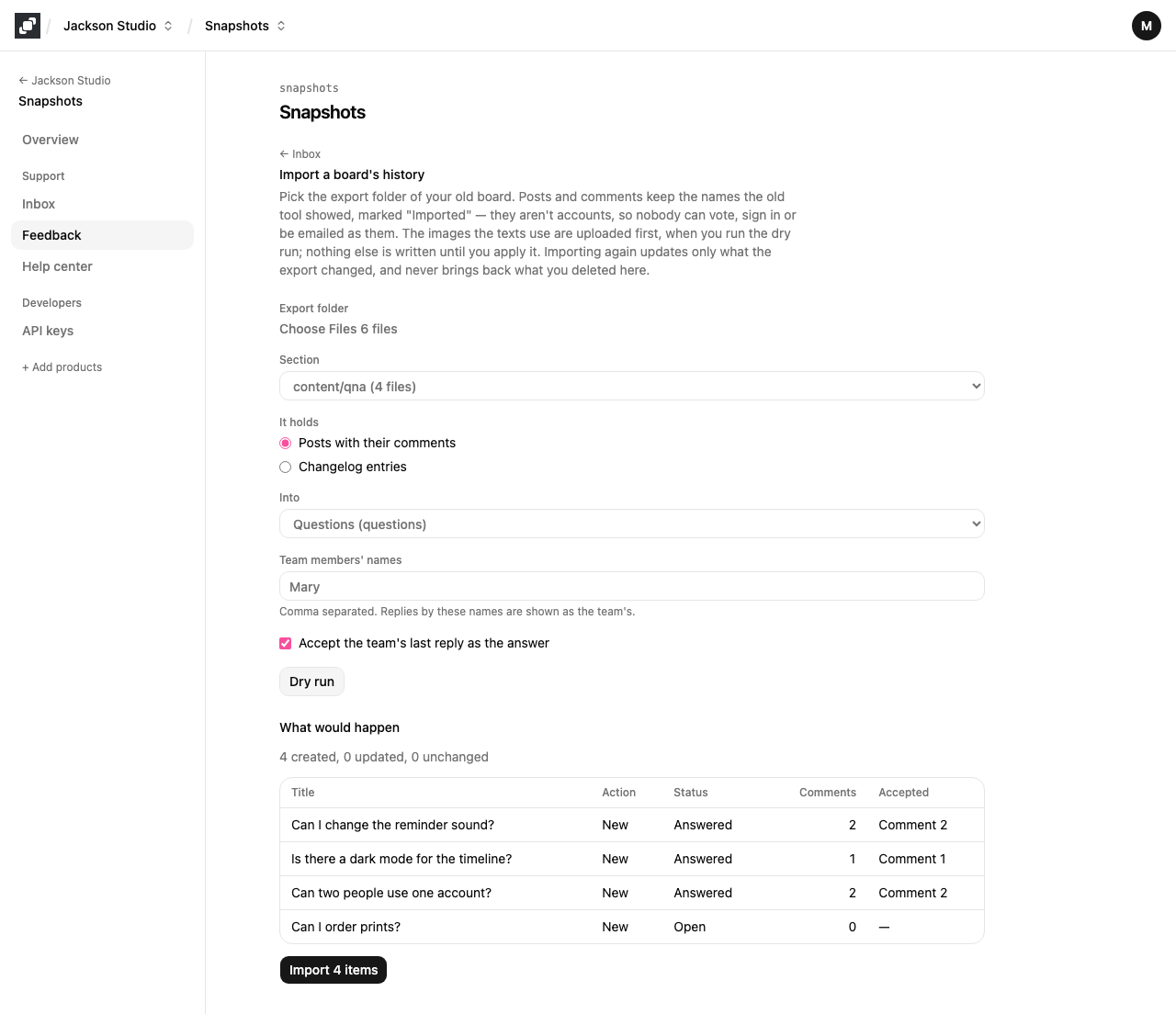
Problems and warnings appear above the table. Any problem disables the import until you fix the folder and run the dry run again; changing any choice on the form starts over from the dry run too.
When the table is what you expect, choose Import. Posts go in oldest first, in batches, so post numbers follow the original order. The button counts the posts it will write, the new and the changed ones; when there are none it reads Nothing to import. The result shows how many were created, updated and left unchanged.
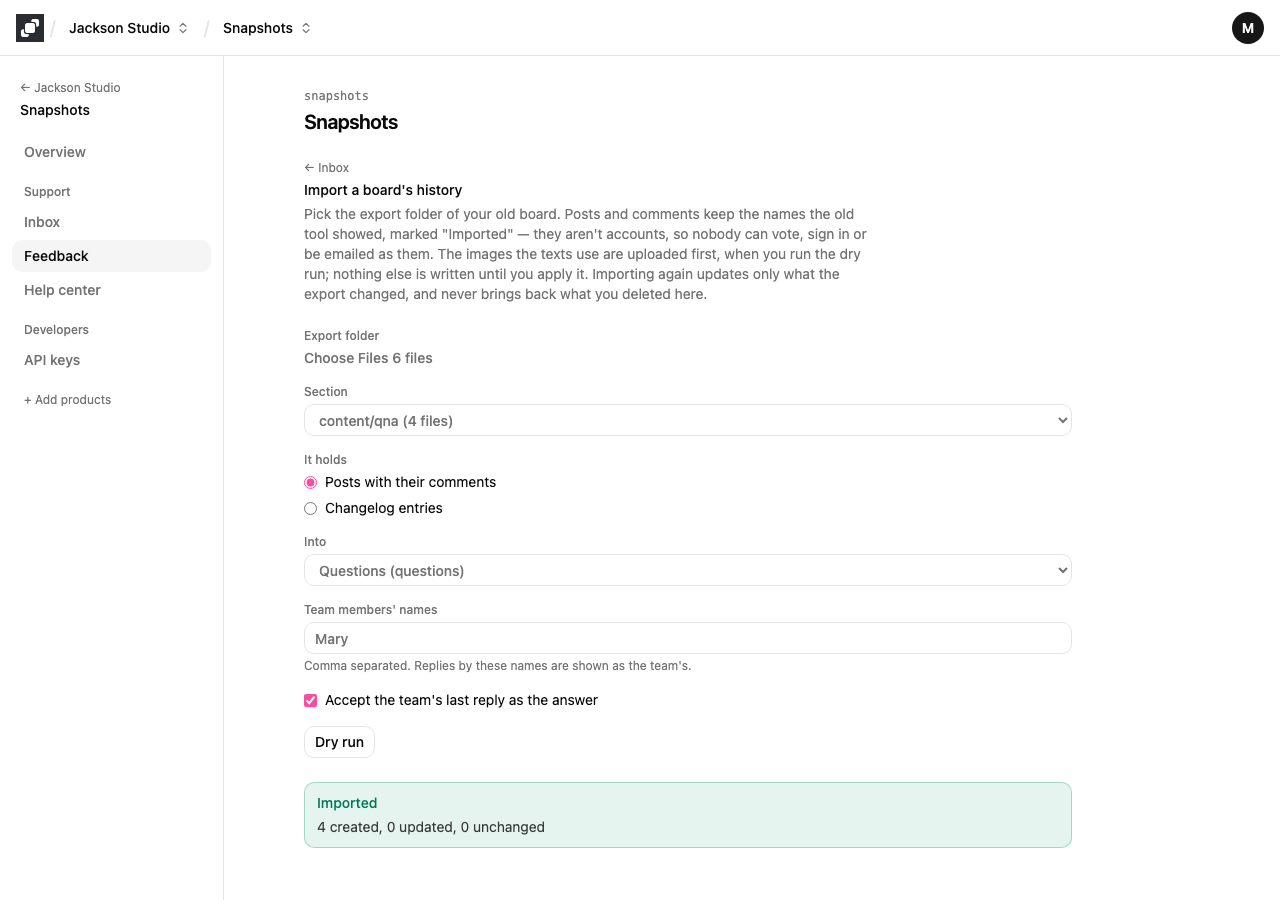
If something stops the import part of the way, the message says what is already done. Run it again: it carries on from there.
3. Import from the command line
The CLI reads the same folder format. It needs a secret API key with the feedback:write scope in MOCCO_API_KEY (see API keys).
mocco feedback import <dir> --board <slug> [--staff <name,name>] [--accept-staff-answers]
                      [--images <images.json>] [--dry-run] [--api-url <url>]
mocco changelog import <dir> --board <slug> [--images <images.json>] [--dry-run] [--api-url <url>]| Flag | Meaning |
|---|---|
<dir> | The folder with the Markdown files, directly in it. |
--board <slug> | The board's address, such as qna. Required. For a changelog, the board the entries belong to. |
--staff <name,name> | Posts only. The authors whose comments are your team's. |
--accept-staff-answers | Posts only. Accept the last team comment as the answer where none is marked. |
--images <file> | The images.json to use, instead of looking in <dir>, its parent and its grandparent. |
--dry-run | Check everything and print the report, but write nothing. |
--api-url <url> | Another Mocco address. Defaults to MOCCO_API_URL, then https://www.mocco.club/api/ext/v1. |
Start with a dry run:
MOCCO_API_KEY=… mocco feedback import ./export/content/qna --board qna --staff Mary --accept-staff-answers --dry-run4 post(s), 5 comment(s), 1 image(s) to upload.
Images: 0 already stored, 1 new (not uploaded in a dry run).
new new answered 2 comments accepted 2 Can I change the reminder sound?
new new answered 1 comment accepted 1 Is there a dark mode for the timeline?
new new answered 2 comments accepted 2 Can two people use one account?
new new open 0 comments no accepted answer Can I order prints?
Would import: 4 new, 0 updated, 0 unchanged.
Dry run: nothing was written.Without a key, a dry run only checks the folder, and says so. With one, it also asks Mocco what each post would become. Run the same command without --dry-run to apply it. The CLI prints the report, then sends 25 posts per request, oldest first, and prints Imported: … at the end. It exits with a non-zero code when the folder has problems, and when another import of the board is running: wait for it and run the command again.
Import update notes
Update notes (release notes, "what's new") use the same folder format and become changelog entries. Each file is one entry:
title,source_urlanddatework as for posts, and the body (up to 50,000 characters) is the entry's text. The entry is published at its date, so the changelog reads in its original order.tagskeeps the ones namednew,improvedorfixed(in any case). Other tags are dropped, and the report says which.Comments are ignored.
mocco changelog import ./export/content/updates --board qna --dry-runThe console does the same: choose Changelog entries under It holds.
4. Running it again
Every post and entry is matched by its source_url, so running an import again never creates a second copy. For each file Mocco compares the content with what it imported last time:
No change. The file is the same, so Mocco writes nothing, even if your team has edited the post in Mocco since.
Update. The file changed, so Mocco rewrites the post's text, author and date, its status when the file sets one, and its imported comments, and leaves comments your team wrote in Mocco alone.
New. A file Mocco hasn't seen.
Skipped. Your team deleted this post, comment or entry in Mocco. An import never brings it back. The report shows it as skipped, "deleted in Mocco".
What your team did in Mocco wins over a re-run. A post you merged into another keeps its status and its answer. When the file sets no status, a post keeps the status your team gave it, such as planned or closed (only an answer the file marks or drops moves a question between open and answered), and an answer accepted in Mocco, by your team or by the person who asked, stays accepted, even on an imported comment. An unpublished or scheduled changelog entry keeps its state.
Several files can share one source_url; some tools write the same address for every update note. Mocco then keeps them apart by adding # and the file's name without .md to each address, so each file is its own entry.
Dates
Mocco keeps the dates of the old site, so the board reads in its original order. A date is understood in any of these forms:
2025.02.04or2025-02-04Feb 4, 2025Feb 4, year not shown, assumed 2025Feb 4, with no year: Mocco takes the latest year in which that day isn't in the future.
A date has no time of day, so Mocco uses 12:00 UTC, which falls on the same day nearly everywhere. A comment keeps its day but never comes before its post, and comments on the same post are kept in the order of the file, a second apart. A date Mocco can't read is a problem, and the report names the file.
Names and who is the team
People you import aren't accounts. A post or comment keeps the name the old site showed, with an Imported mark on the public page. Nobody can vote, sign in or be emailed as an imported name. A post or comment with no name shows only the mark.
Comments by an author you list in Team members' names (--staff) are your team's; every other comment is a user's. Names are matched exactly as written in the file.
Personal data
An import copies what the old site showed publicly, so treat it like moving a public page:
Tell your users first. Announce that the Q&A is moving, and say that their questions and the names shown with them come along.
Import only what was public. Names and the text of posts and comments, and nothing the old site kept private, such as email addresses.
Honour deletion requests. Someone who asks you to remove their post or comment can be taken out by deleting it in the console: Delete post on the post, Delete on a comment. Deleting an imported post or comment is permanent: a re-run skips it instead of bringing it back.
From MCP
Over MCP, mocco_feedback_board_import and mocco_changelog_import import up to 50 posts or entries at a time. Like every change over MCP, they run a dry run first and ask for your confirmation before they write.