
Monitor your service
A monitor checks your service on a schedule, an HTTP request or a TCP connection, and tells your status page when it stops working. Checks run at probe locations: a probe is a small agent you run on a machine that can reach your service. It asks Mocco for work and reports what it saw, so it needs no inbound port.
You need a status page with components first (Run a status page): a monitor changes what its components show.
1. Create a private location
Locations belong to the workspace, so every project can use them. On a project's Status page section, open Locations. Everyone in the workspace can see the list; owners and admins create, rotate and disable locations.
Choose New private location, give it a name ("Office network") and a code. Mocco suggests the code from the name; it is lowercase letters, digits and hyphens, unique in the workspace.
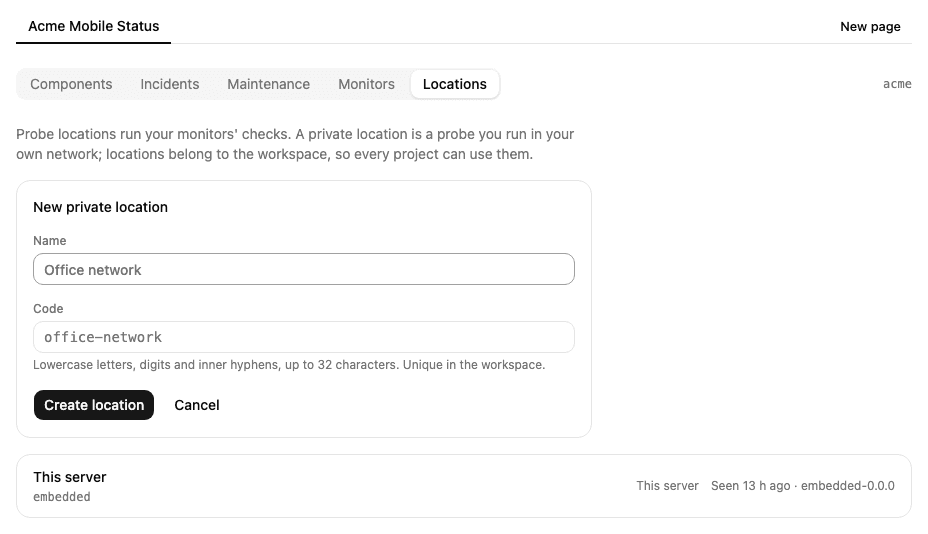
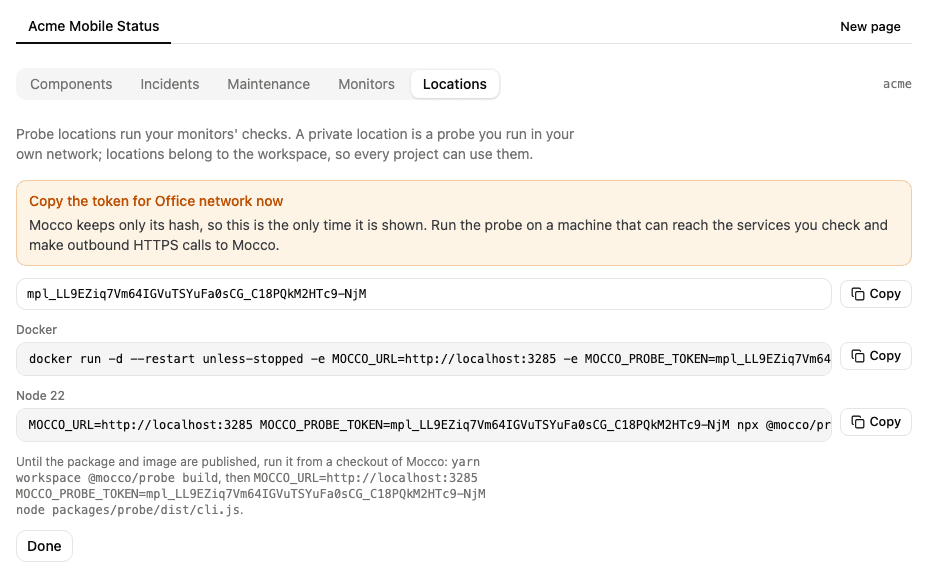
Mocco then shows the location's token once, with the commands that run the probe with it. Copy it now: Mocco keeps only a hash of it, so it can't show it again.
2. Run the probe
On a machine that can reach the services you want to check and can make outbound HTTPS calls to Mocco, run one of the commands shown:
docker run -d --restart unless-stopped \
  -e MOCCO_URL=https://www.mocco.work -e MOCCO_PROBE_TOKEN=mpl_... ghcr.io/fi-workers/mocco-probe
# or, with Node 22
MOCCO_URL=https://www.mocco.work MOCCO_PROBE_TOKEN=mpl_... npx @mocco/probe
Until the package and image are published, run it from a checkout of Mocco: yarn workspace @mocco/probe build, then node packages/probe/dist/cli.js with the same two variables.
The probe starts every exchange itself: it asks Mocco for work and posts what it saw, and Mocco never connects to it. So it runs behind NAT or a firewall as long as the machine can make outbound HTTPS calls (port 443) to Mocco. It needs no inbound port and no public address.
Once it is polling, the location shows Seen just now and the probe's version. Two probes with one token share that location's work.
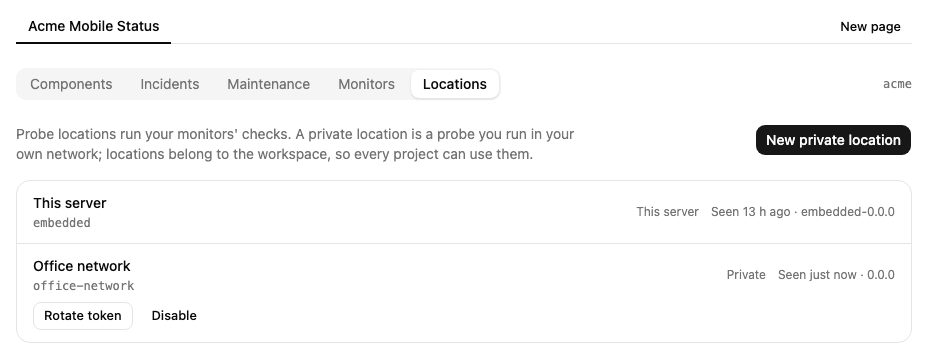
If a probe stops polling for three minutes while a monitor runs there, the location shows Silent and Mocco sends a Location silent alert (status.location.unhealthy) through your notification rules. Its monitors stop waiting for it: the other locations decide their rounds, and a round only this location runs stays unknown, which never counts as downtime. When the probe polls again you get a Location back alert.
Rotate token issues a new token and stops the old one at once: the probe running with it exits, so restart it with the new token. Disable stops the location for good; no monitor can use it after that.
3. Create a monitor
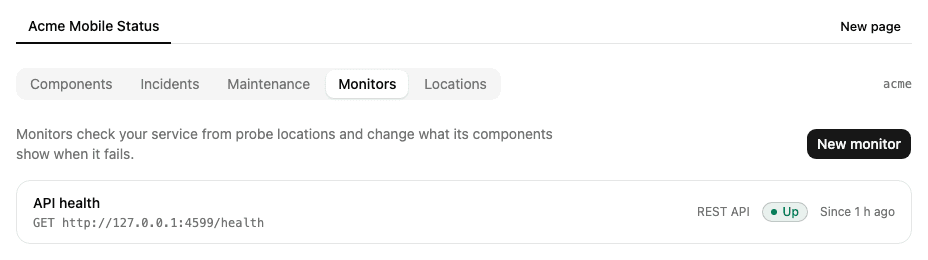
Open Monitors and choose New monitor.
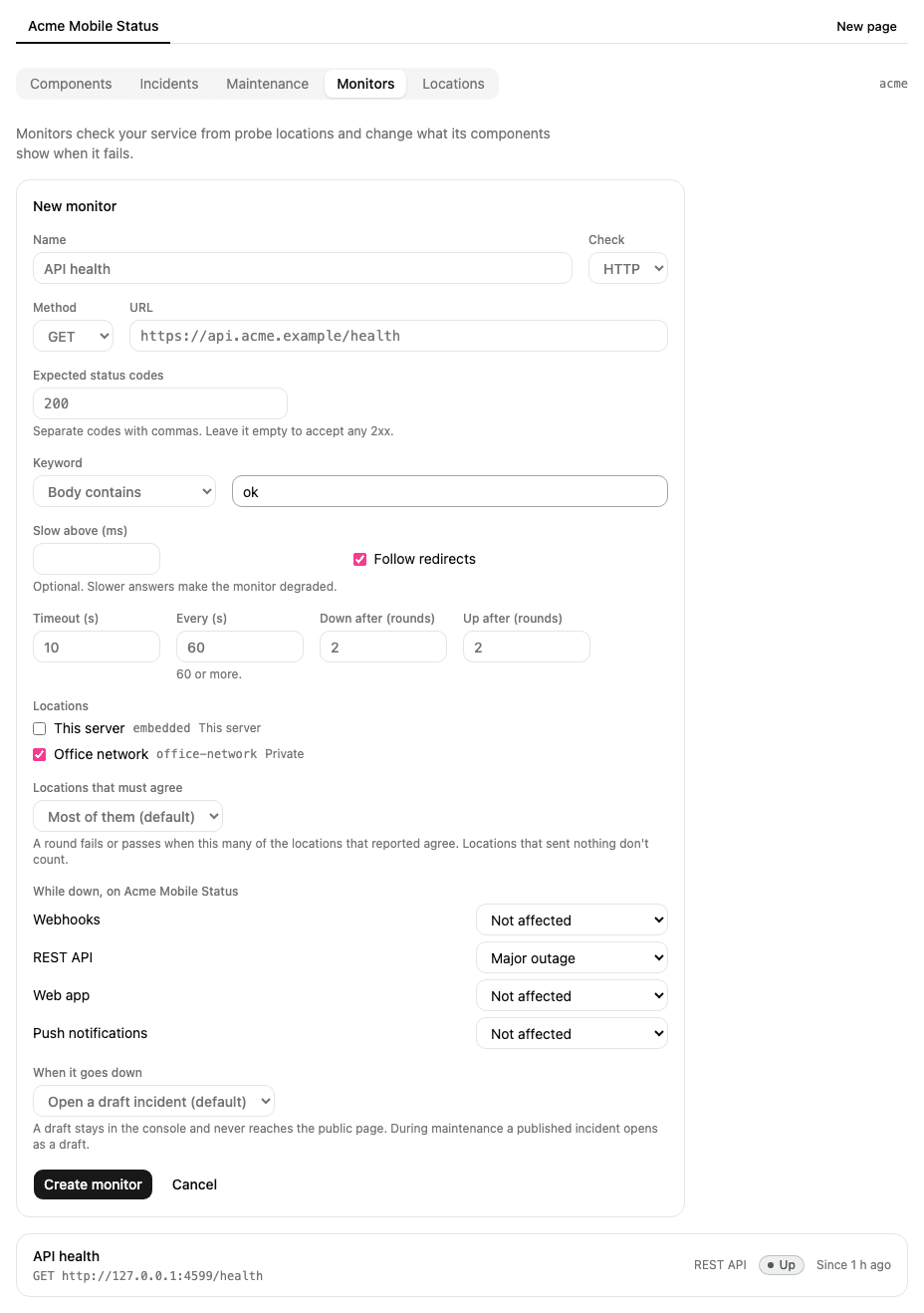
Check: HTTP sends a request to a URL with a method (GET, HEAD or POST, with a body for POST); TCP opens a connection to a host and port.
Expected status codes: the answers that pass, such as
200, 204. Leave it empty to accept any 2xx.Keyword: optionally, the body must contain a word, or must not.
Slow above (ms): optionally, an answer slower than this still passes but makes the monitor degraded.
Warn before certificate expiry (days): optionally, for an
httpsURL, how many days before the TLS certificate expires to warn you. Mocco warns once at that many days left, and again at 7, 3 and 1 day.Timeout: how long one check may take, up to 30 seconds.
Every (s): how often it runs, at least every 60 seconds.
Down after and Up after: how many rounds in a row must fail before the monitor is down, and pass before it is up again. The default is 2, so one bad answer doesn't page anyone.
Locations: where it runs. With several, Locations that must agree decides how many of those that reported must fail (or pass) for the round to count; a location that sent nothing never counts as a failure. Unless you choose Any one, a monitor at several locations needs at least two of them failing to go down, so one location's network trouble never takes it down.
While down: what each component shows while the monitor is down, or Not affected.
When it goes down: open no incident, a draft incident (the default), or a published one.
A new monitor is Pending until its first round, which runs at once.
4. What happens when it fails
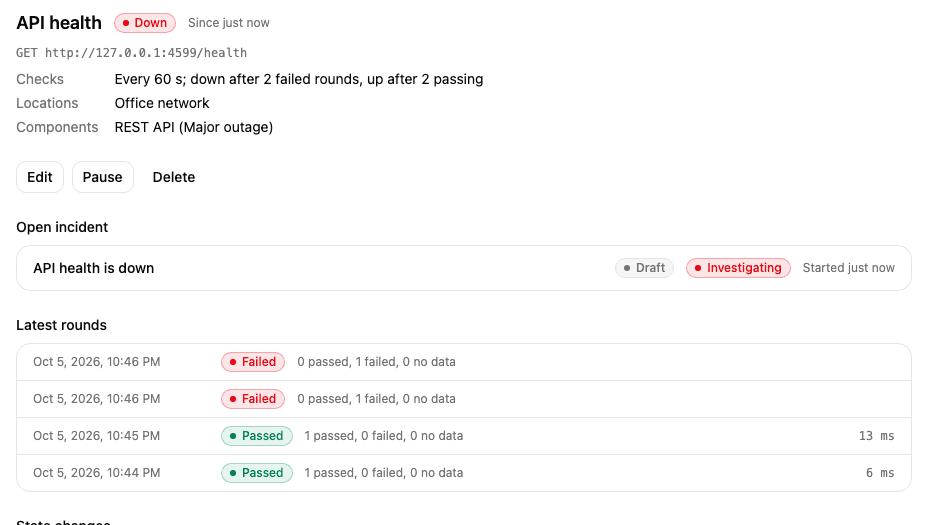
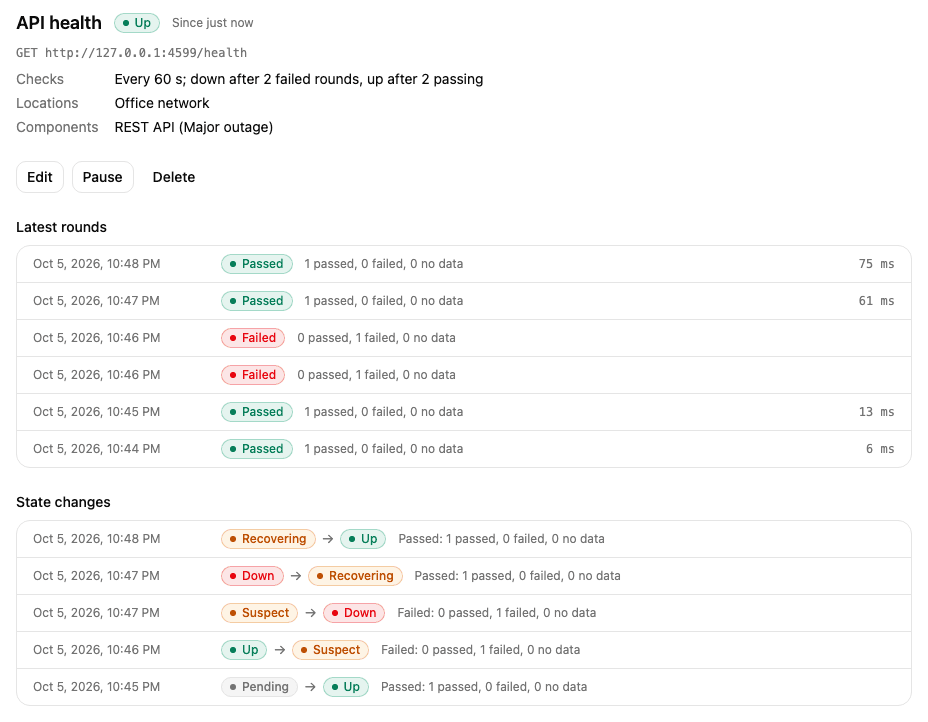
When a round fails, the monitor is Suspect and checks again right away. If it is still failing after Down after rounds, it is Down:
the components you linked show the impact you chose, on the console and on the public page;
an incident opens: "API health is down", Investigating, on the page holding most of those components. A draft stays in the console and never reaches the public page; review it and post your own updates. A published incident opens as a draft while a maintenance window covers the components;
Mocco sends a Down alert (
status.monitor.down) through your notification rules. The alert names only the host and port, never the URL's path, query or credentials.
When checks pass again the monitor is Recovering, and the incident gets a Monitoring update. After Up after passing rounds it is Up: the incident is Resolved, the components go back, and a Recovered alert is sent. A false alarm (Suspect, then Up) sends nothing. A slow answer makes it Degraded and sends a Degraded alert.
A certificate running out is a warning, not an outage: when its days left fall below the number you set, Mocco sends a Certificate expires in N days alert (status.monitor.tls_expiring) once for each threshold, and the monitor stays Up. Renewing the certificate resets the warnings. A certificate that has already expired fails the check, and the monitor goes down like any failure.
The monitor's page lists its latest rounds and every state change. Use Pause to stop checking it (for example while you move the service) and Resume to start again; Edit changes its settings and keeps its state.
5. After a deploy
When a run of a repository linked to the project is released (it succeeded after passing a gate), Mocco watches the project's monitors for 15 minutes: they check every 30 seconds instead of every minute. The monitor's page says which run it is watching after, and until when.
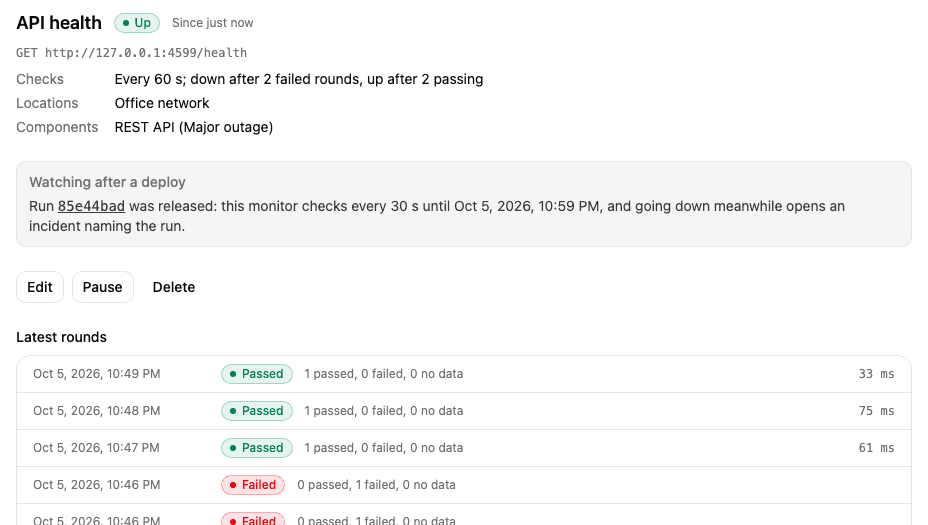
If a monitor goes down during the watch, the incident it opens says it started failing within minutes of a deploy, and the run is listed as Suspected under the incident's Recent deploys. The run's own timeline records the failed check too. The run itself isn't changed or rolled back.
A pipeline step can also ask for a round right away with POST /v1/monitors/{id}/check and a secret key with status:write.
6. Heartbeats for cron jobs and workers
A probe can't see a nightly backup or a queue worker. A heartbeat monitor works the other way round: the job pings Mocco each time it runs, and the monitor goes down when the pings stop or report a failure. It needs no probe and no location.
Choose New monitor, then Check: Heartbeat:
Expected every (min): how often the job runs, such as 1440 for a daily job.
Grace (min): how late a ping may be before it counts as missed, such as 30.
While down and When it goes down work as for any monitor.
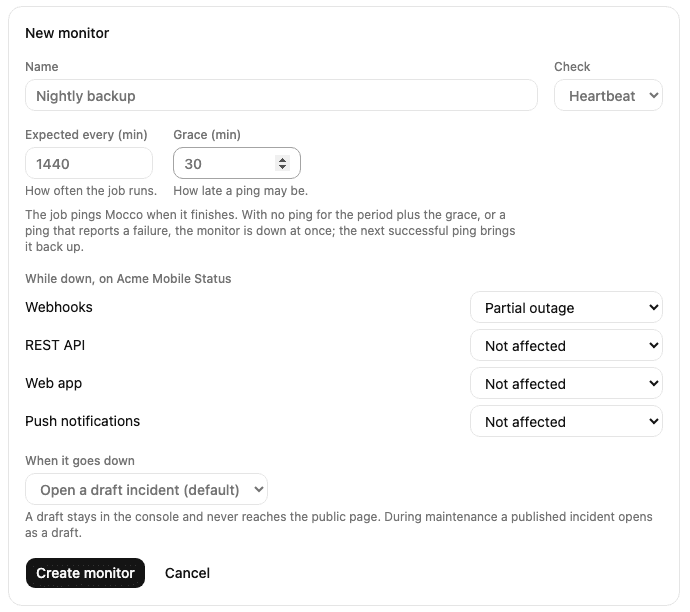
After Create monitor, Mocco shows the monitor's ping URL once, with commands to copy. The token in the URL is its only credential, and Mocco keeps only a hash of it, so copy it now.
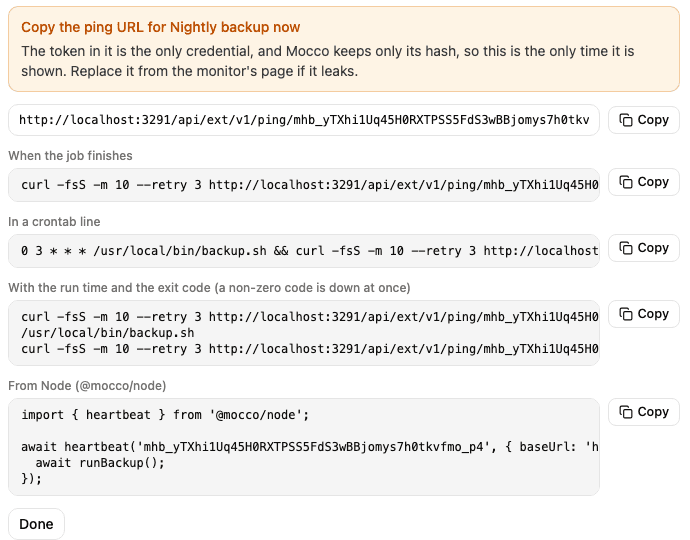
Ping it from the job with GET or POST (no API key):
# when the job finishes
curl -fsS -m 10 --retry 3 https://…/v1/ping/mhb_...
# or report the start, then the exit code (0 is a success, anything else is down at once)
curl -fsS -m 10 --retry 3 https://…/v1/ping/mhb_.../start
/usr/local/bin/backup.sh
curl -fsS -m 10 --retry 3 https://…/v1/ping/mhb_.../$?
/fail reports a failure without a code. From Node, @mocco/node does the same around a function: await heartbeat('mhb_...', { baseUrl }).wrap(async () => runBackup()) pings /start, then success, or /fail when the function throws. A ping that can't be delivered is logged and never breaks the job.
The monitor is Down when no ping arrives for the period plus the grace (a new one, never pinged, counts from its creation), or at once when a ping reports a failure. The next successful ping brings it Up; there is no Down after or Up after to wait for. The components, the incident and the alerts follow as for any monitor (4. What happens when it fails), and the downtime counts in the uptime history.
The monitor's page shows when the last ping came and how long the last run took (from /start to the finish), and each state change says why: a ping, a failure with its exit code, or no ping in time.
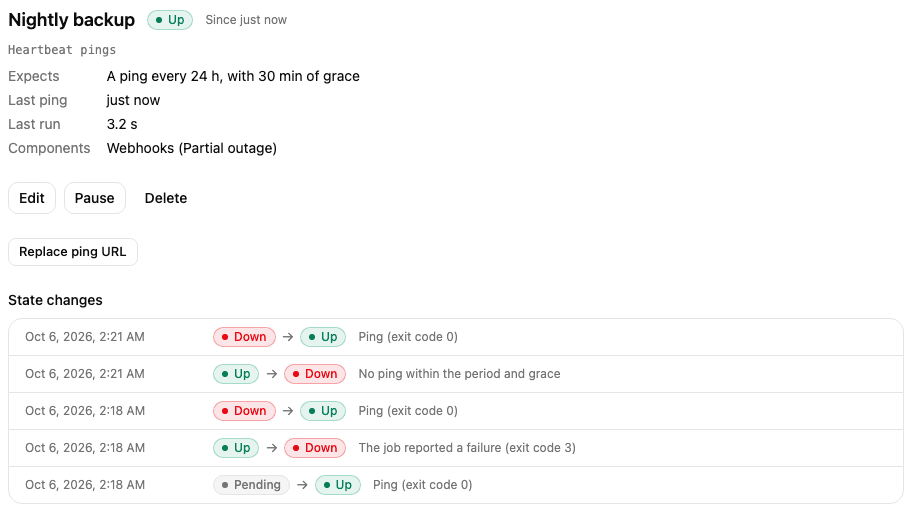
Replace ping URL issues a new URL; the old one stops working at once, so update the job. A paused heartbeat still accepts pings and shows them, but they don't change its state, and after Resume it waits a full period and grace before a missed ping counts. Pings are limited to five every five seconds per URL.
What gets recorded
Creating, editing, pausing, resuming and deleting monitors, replacing a heartbeat's ping URL, and creating, rotating and disabling locations, are written to the workspace's audit log, as are the incidents a monitor opens and updates.