
Connect Mocco to your agent
Mocco speaks the Model Context Protocol, so the assistant you already code with can answer "is the deploy stuck, and on what?" without you leaving the terminal.
The server is remote and hosted by us — nothing to install, nothing to keep updated. You sign in once in the browser and the client holds the token.
https://www.mocco.club/api/mcpThe read tools are in, and so are the deciding tools: voting on an approval request, resuming or rejecting a paused run, changing where notifications go, replying to and assigning messenger conversations, and moving, commenting on, voting on and merging feedback posts. The plan is in the design spec.
What it can do
It reads as you. You see what your Mocco roles let you see, in whichever workspaces you belong to — never more, because the server has no privileges of its own.
| Tool | Answers |
|---|---|
mocco_runs_search | Which runs are running, waiting or failed. Filter by awaiting_gate for "what is blocked" |
mocco_runs_get | One run: its steps, and the gate holding it (with its itemIndex) and what would release it |
mocco_approvals_search | What is waiting on a human right now, each request with a short label of what it is about ("Production", "production channel", "Shopper (iOS)") |
mocco_approvals_get | One request: the change it pins, the requirements, and the votes so far |
mocco_flags_search | Which feature flags a project has, by key or description text, lifecycle, or whether the repository defines them, and where each is on |
mocco_flags_get | One flag: its variants, what it serves in each environment, and whether .mocco/flags.yml manages it |
mocco_flags_changesets_search | Which flag changes wait for approval in a protected environment, each with the approval request deciding it |
mocco_ota_channels_search | What each OTA channel serves now, per platform and runtime version: the release, a rollout in progress and its share, and whether it is paused or rolled back |
mocco_ota_releases_search | Which OTA releases CI uploaded, newest first, by message or commit, runtime version, state or platform |
mocco_ota_adoption_get | How many devices checked in during the last 24 hours, per channel and release, and the app's monthly active devices |
mocco_ota_version_policies_search | The minimum supported, recommended and blocked versions of each iOS and Android app, and whether tightening them needs approval |
mocco_status_pages_get | What a status page says right now: each component and the status it shows, counting open incidents and maintenance in progress |
mocco_status_incidents_search | Which incidents are open (or were), newest first, by status, severity, page or title text, and whether each was opened by hand, by a monitor or by a deploy watch |
mocco_status_incidents_get | One incident: where it came from, the run a deploy watch suspects (with a link to it), every update posted to it, the components it affects and how badly, its postmortem, and the deploys linked to it |
mocco_status_maintenances_search | Which maintenance windows are scheduled or in progress, and the components each covers |
mocco_status_monitors_search | Which HTTP, TCP and heartbeat monitors a project has, what each checks (the host only), its state (for example the ones down) and since when, the components it reports on, and for a heartbeat its period, grace, last ping and last run |
mocco_status_monitors_get | One monitor: its latest state changes and why, its latest rounds, and the incident it opened that is still open |
mocco_status_locations_search | Where monitors run: Mocco's hosted regions, your private locations and the embedded probe, with when each agent was last seen |
mocco_help_articles_search | Which published help center articles match a question (every word, or any word for a customer's message), or every article in order, in a language where translated |
mocco_help_articles_get | One published help article's Markdown, in the asked language where translated, the languages it is published in, and how readers answered "Was this helpful?" in the last 30 days (with their newest comments when detailed) |
mocco_help_translations_list | How far the help center is translated: per language, how many articles are reviewed, machine translated, out of date, failed or not translated, and which articles need attention (or are stale, or failed, or all), with each one's status per language |
mocco_help_translation_get | One article in one language: who reviewed it and when, whether a machine draft is waiting, and exactly which sentences of the original changed since it was translated (with the texts when detailed) |
mocco_help_glossary_list | The help center's glossary every translation follows: names kept as written in every language, and words translated one fixed way per language, found by text, rule or language |
mocco_messenger_conversations_search | Which messenger conversations are open (or closed), newest activity first, by assignee (yours, someone's, or no one's) or by contact (id, email or your app's user id), with a preview of the latest message and whether you have read it |
mocco_messenger_conversation_get | One conversation's thread: every message from the user and your team, internal notes marked, and each attachment's name, type and size |
mocco_feedback_boards_list | Which feedback boards a project has, whether each is public, and their categories in order |
mocco_feedback_posts_search | A board's posts by status (under review, planned, in progress, shipped, closed) or newest first, by status or category, a page at a time |
mocco_feedback_post_get | One feedback post, and every status it took and when |
mocco_feedback_votes_list | Who voted for a feedback post (your app's id for each end user), and whether each vote counts yet or waits for an email confirmation |
mocco_feedback_comments_list | A feedback post's comments as your team sees them: end users' comments, your official response, and internal notes, marked |
mocco_notifications_channels_search | Which Discord channels Mocco posts to, and why a disabled one is disabled |
mocco_notifications_rules_search | Which events go to which channel: the event type, the source and the filter of each rule |
mocco_notifications_activity_search | What became of each webhook and Mocco event: per channel, sent or failed (with the error), or why it got nothing |
mocco_inbound_sources_search | Which Sentry, Vercel and GitHub webhook sources the workspace has, whether each accepts deliveries, and what became of the latest |
Reads take a responseFormat: concise by default, detailed when the agent wants the
commit and the gate requirements too. That keeps a search from spending your context on
rows you did not ask about.
Which workspace? If you belong to one, say nothing. If you belong to several, the tool asks which and names them — and a workspace you are not a member of is refused whether or not it exists.
Which project? The flag tools read one project. If the workspace has one, say nothing;
otherwise the tool names the projects to pick from. They answer only where the workspace
has feature flags turned on, as the console does. The flag tools only read: change a flag
in the console, or in .mocco/flags.yml for a flag the repository manages.
The OTA tools pick their project the same way and answer only where OTA is turned on. The
channel, release and adoption tools read one hosted app: leave appId out when the
project hosts one, or the tool names the apps to pick from. They only read; promote, roll
out, pause, roll back and change a version policy in the console or with mocco ota.
The status page tools pick their project the same way and answer only where the status
page is turned on. mocco_status_pages_get reads one page: leave pageId out when the
project has one, or the tool names the pages to pick from. The incident and maintenance
searches read every page of the project unless you name one. A monitor shows only the
host it checks: its full URL, request body and keyword stay on the server, since they can
hold credentials. A heartbeat shows its period, grace, when its job last pinged and how long
its last run took, never its ping token. The location tool reads the whole workspace for any
member and never returns a location's token. An incident says whether it was opened by hand,
by a monitor or by a deploy watch; for a deploy watch's, it names the run it suspects and links
to it in the console. Apart from checking a monitor now (below), they only read; declare an
incident, post an update, schedule maintenance, and add, pause or change a monitor or a
location in the console.
The messenger tools pick their project the same way and answer only where the messenger is
turned on, for any member of the workspace, as the inbox does. They read internal notes too,
since your team sees them in the inbox. An attachment comes back as its name, type and size,
never as a link to the file: open the conversation in the console to see it. A user's email,
your app's user id for them, their traits and the devices they wrote from are in the
detailed answer only.
The feedback tools pick their project the same way and answer only where feedback is turned
on, for any member of the workspace. A post's body is cut short
unless you ask for the detailed answer, which also names who wrote it and who changed each
status (as user ids).
The notification and webhook source tools read the whole workspace, with no project to
pick, and answer for any member, as the console does. They never return a signing
secret or a token: a source says whether it has a secret, and the detailed answer gives
the ingest URL your vendor is configured with, which is no credential on its own because
every delivery must also be signed. To find out why a notification did not arrive, ask
for the activity trace with the source or channel. They only read; connect channels,
edit rules and add sources in the console or with the changing tools below. On a self-hosted server without
SECRETS_ENCRYPTION_KEYS, the source tool says webhook sources are not configured.
Deciding is separate and off by default.
| Tool | Does |
|---|---|
mocco_approvals_vote | Approves or rejects a pending request as you, with an optional reason |
mocco_gates_resume | Resumes or rejects the gate a run is paused at, as you, with an optional reason |
mocco_notifications_channels_connect | Connects a Discord channel of your workspace's server as a notification channel; Mocco posts a test message |
mocco_notifications_channels_reenable | Turns a disabled notification channel back on, once the bot can reach it again |
mocco_notifications_rules_add | Sends an event type (from one source or any, optionally filtered by its facts) to a channel |
mocco_notifications_rules_remove | Removes a rule, so its events stop going to its channel |
mocco_notifications_presets_apply | Adds a ready set of rules (mocco, sentry, vercel, github) to a channel, skipping any it has |
mocco_inbound_sources_create | Adds a GitHub webhook source; its signing secret is never shown to the agent |
mocco_inbound_sources_pause / _resume | Pauses a webhook source (its deliveries are refused) or resumes it |
mocco_inbound_sources_delete | Deletes a webhook source and the deliveries it received |
mocco_monitors_check | Runs an HTTP or TCP monitor's next round now, for example right after a deploy, instead of at its interval |
mocco_messenger_reply | Sends a text reply to a messenger conversation as you; the user reads it in your app |
mocco_messenger_assign | Gives a messenger conversation to a member of the workspace (you, or someone else) or to no one |
mocco_feedback_post_set_status | Moves a feedback post to another status as you, recorded in its history |
mocco_feedback_comment_create | Comments on a feedback post as you: a public comment, the official response, or an internal note only your team sees |
mocco_feedback_post_vote | Records an end user's vote on a feedback post on their behalf, as you; it counts at once |
mocco_feedback_post_merge | Merges a duplicate feedback post into the post it repeats, as you; votes and followers move over |
Deciding is switched on per workspace by an owner or admin (below). Until then your agent can tell you a change is waiting on a second approval; it cannot be that approval.
When it is on, every decision asks you first. For a vote, your client shows what is about to happen — approve or reject, the kind of request, what it is about, the exact change it would let through, and your reason. For a paused run, it shows resume or reject (a reject halts the run), the repository, the commit with its branch, the gate and what it requires, and your reason. Nothing is recorded until you answer yes. Declining, or closing the prompt, votes nothing. That confirmation is the protocol's own step, not a prompt we wrote, and it is what stops a page of text your agent read somewhere from turning into a production deploy. A confirmation is good for five minutes and only for the decision it showed: change the decision or the reason and you are asked again.
A notification change shows exactly what would change: the server and channel to connect,
the channel to turn back on and why it is off, the event type, source, filter and channel
of a rule to add or remove, or every rule of a preset. Only an owner or admin may change
notification settings, as in the console: a plain member is refused before being asked.
To find the channel to connect, mocco_notifications_discord_channels_search lists the
text channels the Mocco bot sees in your server and which are connected already; it is a
read, but owners and admins only, because it spends the shared bot's Discord calls.
Installing the bot in a Discord server and removing a channel stay in the console for now.
Checking a monitor now. mocco_monitors_check is what a pipeline step does with
POST /v1/monitors/{id}/check: the probes check your service right away, and
mocco_status_monitors_get shows the verdict once they report. It moves the monitor's next
round, so it follows the same rules as the other changes: the workspace must allow agents to
make changes, and your client first shows the monitor, what it checks, its state and when its
next round is due. Nothing runs until you answer yes. It needs its own permission, asked for the
first time it is used: Run your status monitors' checks now, as you. Any member of the
project may check its monitors, as in the console. A heartbeat (its job pings it) and a paused
monitor are refused before you are asked anything.
Replying and assigning in the messenger. mocco_messenger_reply sends what the inbox's
Send does: your user reads it in the app, and gets a push notification if they turned them
on. Your client first shows who it goes to and the exact text, and nothing is sent until you
answer yes. A confirmation is for a reply after the conversation's latest message, so answering
it twice sends once, and if the user writes again before you answer, you are asked afresh. It
sends text only; attach files, leave internal notes, close a conversation and block a user in
the console. mocco_messenger_assign is the hand-off: your client shows who has the
conversation now and who would take it, and someone outside the workspace is refused before
you are asked. Round robin still assigns new conversations when they start. Both follow the
same rules as the other changes, need the workspace to allow agents to make changes, and
need their own permission, asked for the first time either is used: Reply to and assign
your messenger conversations, as you. Any member of the workspace may reply and assign, as
in the inbox, and an assignment is recorded in the audit trail naming you.
Moving a feedback post. mocco_feedback_post_set_status does what changing a post's
status on the board does: the post gets the new status (moving it to shipped records when it
shipped, and moving it away clears that), and the change goes into the post's history and the
audit trail, naming you. Your client first shows the post, the status it has now and the one
it would get, and nothing changes until you answer yes. A confirmation is for a move from the
status the post had when you were asked: if anyone moves the post before you answer, the
answer is refused and you are asked afresh, and answering the same confirmation twice moves
it once. Asking for the status a post has already answers without asking you. It follows the
same rules as the other changes, needs the workspace to allow agents to make changes, and
needs its own permission, asked for the first time it is used: Move, comment on, vote on and merge your feedback posts, as you. Any member
of the workspace may move posts, as on the board.
Commenting, voting and merging on feedback. The same permission and the same workspace switch cover three more changes, each confirmed in your client first:
mocco_feedback_comment_createshows the post, what kind of comment it is (public, the official response, or an internal note) and the exact text. An official response can't also be internal.mocco_feedback_post_voterecords a vote for one of your app's users, by the id your app knows them by, for when someone asked by email or on a call. It counts at once and they follow the post. A vote that counts already answers without asking. If the person votes themselves before you answer, the answer is refused and you are asked afresh.mocco_feedback_post_mergenames both posts and their votes. The duplicate's votes and followers move to the other post (someone who voted on both counts once), and the duplicate is closed, keeping its comments and history. A merge can't be undone. If either post gets a vote before you answer, you are asked again with the new counts; if either is merged elsewhere, the merge is refused.
Webhook source changes follow the same rules, and a signing secret never passes through
your agent. mocco_inbound_sources_create adds a GitHub source but does not return the
secret Mocco generates for it: to get one to paste into GitHub, open Notifications →
Sources in the console and rotate the source's secret. A Sentry or Vercel source needs
the secret those services show you, so the tool refuses and points you to the console,
where you paste it. Rotating a secret and renaming a source also stay in the console.
The decision is then recorded exactly as if you had clicked it in the console. The request's or gate's own rules still apply: you need one of the roles it asks for, you cannot approve a change you requested, or resume a run you triggered, when it forbids that, and you get one vote. A gate that needs several people stays paused until they have all voted; the tool says where it stands.
What it will never do
Act as anyone but you. Every action goes through the same check the console does, with your identity. An agent cannot approve what you could not approve.
Accept an API key for a decision. A key is a project, not a person, and an approval has to name someone who could have been asked. Keys get the read tools.
Hide anything from the audit trail. A vote, a resume or a notification change made through an agent appears in the chain exactly like one made in the console, naming you.
Add it
Claude Code
claude mcp add --transport http mocco https://www.mocco.club/api/mcpThen run /mcp and pick mocco to sign in. Check it took with:
claude mcp listClaude Desktop and claude.ai
Settings → Connectors → Add custom connector, and paste the URL above. The browser sign-in happens inline.
Cursor
.cursor/mcp.json in the project, or ~/.cursor/mcp.json for every project:
{
  "mcpServers": {
    "mocco": {
      "url": "https://www.mocco.club/api/mcp"
    }
  }
}
Cursor opens the browser for sign-in by itself. Leave out any headers — this server uses OAuth, not a token you paste.
VS Code
.vscode/mcp.json:
{
  "servers": {
    "mocco": {
      "type": "http",
      "url": "https://www.mocco.club/api/mcp"
    }
  }
}
VS Code runs the OAuth flow itself, so there is nothing to put in headers or inputs.
Anything else
Any client on the 2026-07-28 MCP revision works: point it at the URL and let it
discover the rest. An unauthenticated call is answered with a 401 that points to the
protected-resource metadata at /.well-known/oauth-protected-resource/api/mcp, which names
the authorization server; its own metadata is at
/.well-known/oauth-authorization-server/api/auth. A conforming client follows both
without being told.
It serves that revision only, over POST. A client still on the older HTTP+SSE transport
will not connect — upgrade it, or use the mocco CLI in the meantime.
Approving the connection
The first time a client connects, your browser opens Mocco. Sign in if you aren't already, and Mocco asks whether to let that app read as you:
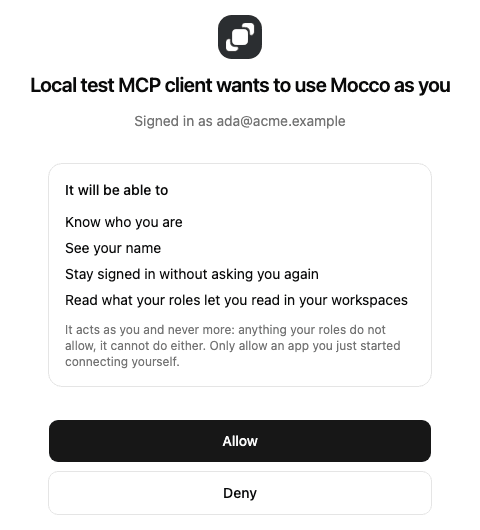
Allow sends you back to the client, which finishes connecting by itself. Deny tells the client you said no, and it gets nothing. Once you allow an app, Mocco remembers, so reconnecting it later doesn't ask again.
Only allow an app you just started connecting. If this screen appears and you didn't start anything, choose Deny.
Allowing an app to vote
Connecting does not let an app vote or resume. The first time your agent tries to, Mocco answers that the connection needs one more permission, and your client opens the same screen again with one new line: Approve or reject changes as you, in workspaces that allow agents to decide. Allow it and the client carries on with the decision, which still asks you to confirm it. Deny it and the app keeps reading, as before. The same permission covers voting and resuming: what you may decide is still set by your roles.
You are asked once per app. The permission does nothing in a workspace that has not allowed agents to decide, and nothing beyond what your roles allow anywhere.
Turning the deciding tools on
An owner or admin enables them per workspace: Settings → Agents → Allow agents to decide. Switching it on records who did, and every tool it unlocks is still bound by the roles of whoever calls it.
Leave it off for workspaces where an agent only needs to report. That is most of them.
If it will not connect
| What you see | What it means |
|---|---|
| The client asks for a token or header | It is treating this as a key-authenticated server. Remove the header; this one is OAuth |
405 Method Not Allowed on connect | The client is trying GET or DELETE. It is on the old transport — upgrade it |
| "Agents may not vote in this workspace" | Deciding is off for that workspace. An owner or admin can turn it on in Settings → Agents |
| "This connection may not vote" | The app was never allowed to vote. Reconnect it and allow the voting permission when asked |
| "This connection may not run checks" | The app was never allowed to run checks. Reconnect it and allow the checks permission when asked |
| "Agents may not run checks in this workspace" | Changes are off for that workspace. An owner or admin can turn them on in Settings → Agents |
| "… is a heartbeat; its job pings it" | A heartbeat has no rounds to run. Its last ping is in mocco_status_monitors_search |
| "… is paused; resume it in the console to check it" | Resume the monitor in the console first |
| "This connection may not reply in the messenger" or "… may not assign conversations" | The app was never allowed to reply or assign. Reconnect it and allow the messenger permission when asked |
| "Agents may not reply in the messenger in this workspace" | Changes are off for that workspace. An owner or admin can turn them on in Settings → Agents |
| "… isn't a member of this workspace" | A conversation can only go to a member of the workspace. mocco_messenger_conversations_search names the people who have conversations now |
| "Conversation … was not found" | It is in another project or workspace, or the id is wrong. Search the inbox first |
| "This connection may not change feedback statuses" (or comment, record votes, merge feedback posts) | The app was never allowed to change feedback. Reconnect it and allow the feedback permission when asked |
| "Agents may not change feedback statuses in this workspace" (or comment, record votes, merge) | Changes are off for that workspace. An owner or admin can turn them on in Settings → Agents |
| "That confirmation was for a different change" after moving a post | Someone moved the post before you answered. Call again to be asked about the move from its status now |
| "That confirmation was for a different change" after a vote or a merge | The end user voted, or one of the posts got a vote, before you answered. Call again to be asked with the counts as they are now |
| "… was merged into … already" | A merged post can't be merged again, merged into, or voted on. Use the post it was merged into |
| "Posts can only be merged on the same board" | Move the posts to one board first, or merge within each board |
| "Feedback board … was not found" or "Feedback post … was not found" | It is in another project or workspace, or the id is wrong. mocco_feedback_boards_list and mocco_feedback_posts_search give the ids |
| "not in a role authorized to approve" | Your roles do not cover this request. Someone in one of the roles mocco_approvals_get lists has to vote |
| "Agents may not resume or reject runs in this workspace" | Deciding is off for that workspace. An owner or admin can turn it on in Settings → Agents |
| "No pending gate at index …" | The run is not paused at that gate any more — it moved on, was decided, or is in another workspace. mocco_runs_get shows what it waits on now |
| "cannot resume a gate on a run you triggered" | The gate forbids the person who started the run from releasing it. Someone else in its roles has to |
| "not in a role authorized to resume" | Your roles do not cover this gate. Someone in one of the roles mocco_runs_get lists has to |
| "Agents may not change notification settings in this workspace" | Changes are off for that workspace. An owner or admin can turn them on in Settings → Agents |
| "Agents may not change webhook sources in this workspace" | The same switch, for webhook sources |
| "a secret must never pass through an agent" | Sentry and Vercel sources are added in the console, where you paste their secret |
| "Only an owner or admin of workspace … can do this" | Notification settings are for owners and admins, in the console and here alike |
| The browser reports an invalid scope when you allow voting | The app was connected before voting existed, and Mocco has not yet refreshed what it may ask for. It does within the hour; try again then |
| The browser opens Mocco's sign-in and then lands on your workspaces instead of the client | The page was opened without the client's request in its address. Start the connection again from the client |
| Tools from the wrong workspace | You belong to several. Ask the agent to switch workspace, or pin one in the client config |