Keep your help center in git
Your help articles can live in your repository as Markdown, reviewed in pull requests like code. On every merge, CI pushes them to your help center: new pages are created, changed pages get a new revision and are published, and everything else is left alone. Translations, search, feedback and the public site work as they do for articles written in Mocco, and you can keep the translations in git too. Mocco's own guides are published this way.
1. Lay out the folder
Put each section's pages in a folder, with their images in images/ beside them:
docs/help/
  help.json
  glossary.csv          (optional)
  start/
    overview.md
    install.md
    images/
      home.png
  billing/
    plans.md
Each page starts with frontmatter that has a title. The page's own # Title line, if it has one, is dropped, because the site shows the title as the page heading.
---
title: Install the app
---
# Install the app
Download it from the [overview](./overview.md#download).
Links between pages are ./page.md or ../folder/page.md, with an optional #anchor. On the site they lead to that article in the reader's language. Images are ./images/<name> (PNG, JPEG, WebP or GIF, up to 10 MB). Any other relative link fails the push, so a typo is caught before it reaches readers.
2. Write the manifest
help.json says where each folder appears and in what order:
{
  "collections": [
    {
      "slug": "guides",
      "title": "Guides",
      "sections": [
        { "folder": "start", "title": "Getting started", "pages": ["overview", "install"] },
        { "folder": "billing", "title": "Billing", "pages": ["plans"] }
      ]
    }
  ]
}
A page the manifest doesn't list follows the listed ones alphabetically. A folder it doesn't list fails the push.
3. Create a key
On the project's API keys page, create a secret key with only the help:write scope. Store it as a CI secret, for example MOCCO_API_KEY. The project needs its help center set up first.
4. Push from CI
name: Help center
on:
  push:
    branches: [main]
    paths: ['docs/help/**']
jobs:
  push:
    runs-on: ubuntu-latest
    steps:
      - uses: actions/checkout@v5
      - run: npx @mocco/cli help push docs/help --glossary docs/help/glossary.csv --prune
        env:
          MOCCO_API_KEY: ${{ secrets.MOCCO_API_KEY }}
Pin the action and the CLI version you use. The command prints what it did:
12 page(s), 30 image(s), 8 glossary term(s).
Images: 2 uploaded, 28 already stored.
Glossary: 0 added, 1 changed, 7 unchanged.
Articles: 0 created, 3 updated, 9 unchanged; 3 published, 0 unpublished.
Images are offered by their checksum first, so a push only uploads new ones.
--dry-runchecks every page, link and image and sends nothing. It needs no key, so run it on pull requests.--pruneunpublishes pages pushed before that are no longer in the folder. Their history and translations stay, and a page that comes back is published again. Articles written in Mocco are never touched. It also hands translations whose file you removed back to the machine (Translations).--no-publishleaves new and changed pages as drafts, to publish from Mocco.--glossaryadds or updates glossary terms from a CSV in the same format as Import CSV on the Glossary page. Terms the file doesn't have stay.
Each page's path in the folder (/start/install) is kept as an address on the site that redirects to the article. Renaming a page's file makes it a new article; with --prune the old one is unpublished.
5. Translations
If the help center offers other languages, every page is translated. You decide per page and language whether the text comes from git or from the machine:
A file in git is used as it is. Put the translation at
<locale>/<folder>/<page>.mdin the same docs folder, with the same path as its source page, and a push saves it as the reviewed text. The machine never overwrites it.No file, no problem. A page without a file in a language is translated by Mocco, and its text can be corrected in git later.
docs/help/
  help.json
  start/
    overview.md
    images/
      home.png
  ko/
    start/
      overview.md
A translation file has the same frontmatter as its source (title, then the body). Write images as ./images/<name> and links as ./page.md exactly as the source does: they point at the source folder's images and pages, and the locale folder holds no images. A file whose source page doesn't exist fails the push, and so does a folder for a language the help center doesn't offer.
Any top-level folder that isn't in help.json is read as a language, so don't name a section like a language code.
What a push does with a translation
| In git | What the push does |
|---|---|
| A file with new text | Saves it as the reviewed translation of the source you are pushing, and drops any machine draft beside it |
| A file with the same text | Leaves it alone |
| A file, but its source changed in this push and it didn't | Keeps serving the file's text, marks it stale, and drafts a machine proposal beside it |
| No file, and the page was never a git translation | The machine translates it, as before |
| No file, but the page had a git translation | Keeps serving it and reports it as gone. With --prune, the page goes back to the machine and is translated again |
A translation edited in the same commit as its source is taken to answer that source. One you left alone isn't, which is how the push knows it is stale. The command prints one line per language. When --prune unpublished pages, it ends with ; unpublished and their paths; when a push without --prune finds git translations whose file is gone, it ends with ; gone, their paths and a reminder that they are kept:
ko: saved 3, unchanged 9, stale 1 (/start/install), handed back 0.
ko: saved 0, unchanged 12, stale 0, handed back 0; gone /start/keys (kept; push with --prune to hand them back to the machine).
Add --fail-on-stale to make the push exit with an error after importing when any translation is stale, if you want CI to insist that translations keep up. Without it, the stale page keeps its last reviewed text and the report lists it. --dry-run checks every translation file and lists which pages have one in each language.
Bring the machine's text into git
To correct a machine translation in a pull request, pull it into the folder first:
npx @mocco/cli help pull docs/help --locale koThis needs a secret key with help:write, like the push, because unpublished text and machine drafts are not public. It writes a file for every page that doesn't have one in that language and reports the count:
ko: 12 written, 0 already there.Pull the language.
Correct the files in a pull request.
Merge. The next push saves the files that changed as reviewed translations; from then on they are git translations.
Pages the machine hasn't finished, or hasn't started on yet (a page you just added), are listed so you can pull again later. Two flags change what is written:
--overwritealso replaces files you already have, to take the site's current text or recover from a bad edit.--proposalswrites the machine's proposal instead of the served text for a stale translation, replacing its file without--overwrite, so the correction starts from a draft of the new source. Other files you already have stay as they are.
A pull followed by a push with no edits changes nothing.
6. What changes in the console
The first push marks the help center as managed in git, because git must stay the only source. Use --no-manage to push without that, and --source <url> to record where the folder lives (omit it on later pushes to keep the one stored).
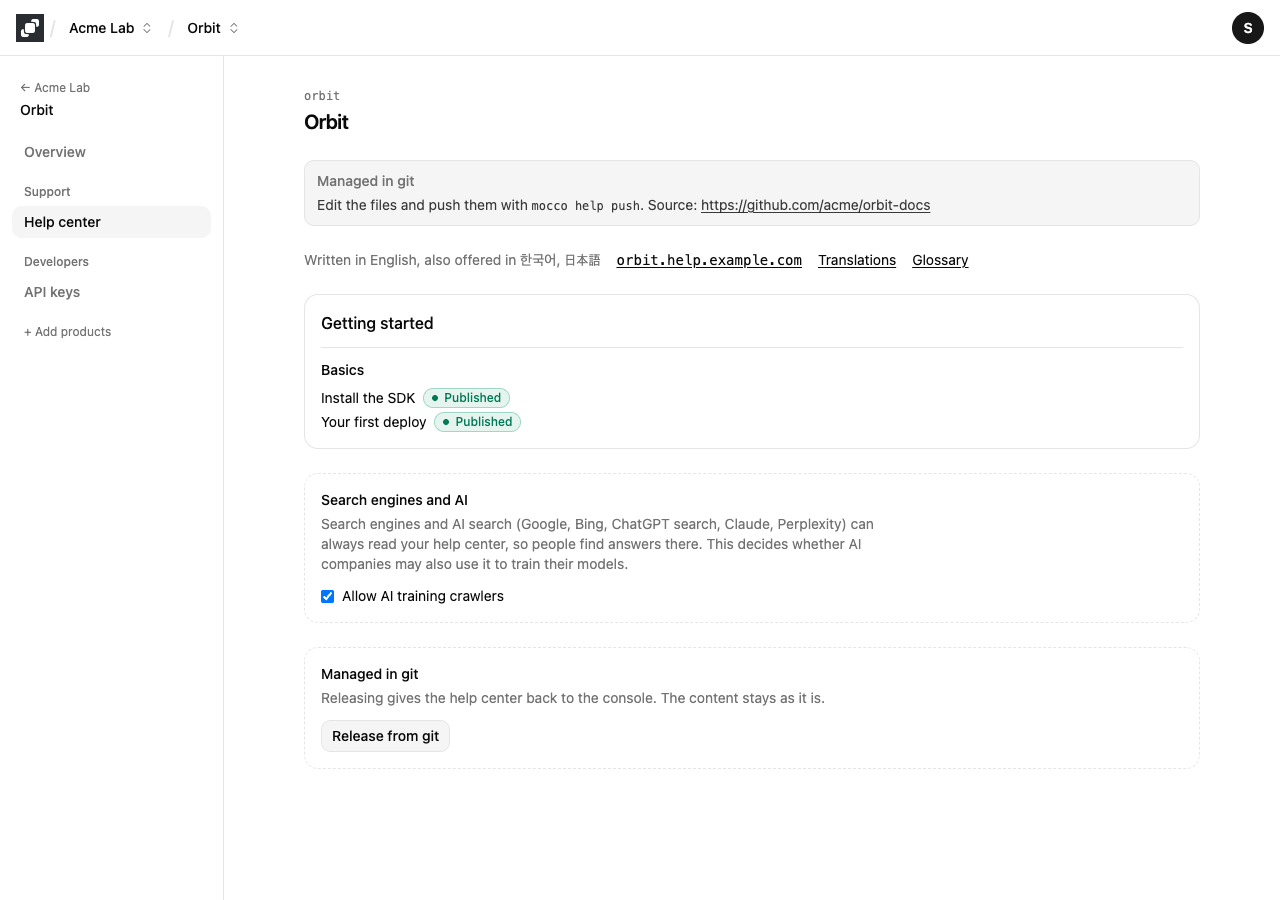
On a managed help center:
The banner shows the repository and the edit controls are gone: articles, collections, sections, translations and the glossary can't be changed in the console, over MCP or the API. Only a push changes them, so it can never overwrite an edit someone made on the side.
Site settings stay editable: languages, address, AI training and feedback. Adding a language translates every article into it with the machine.
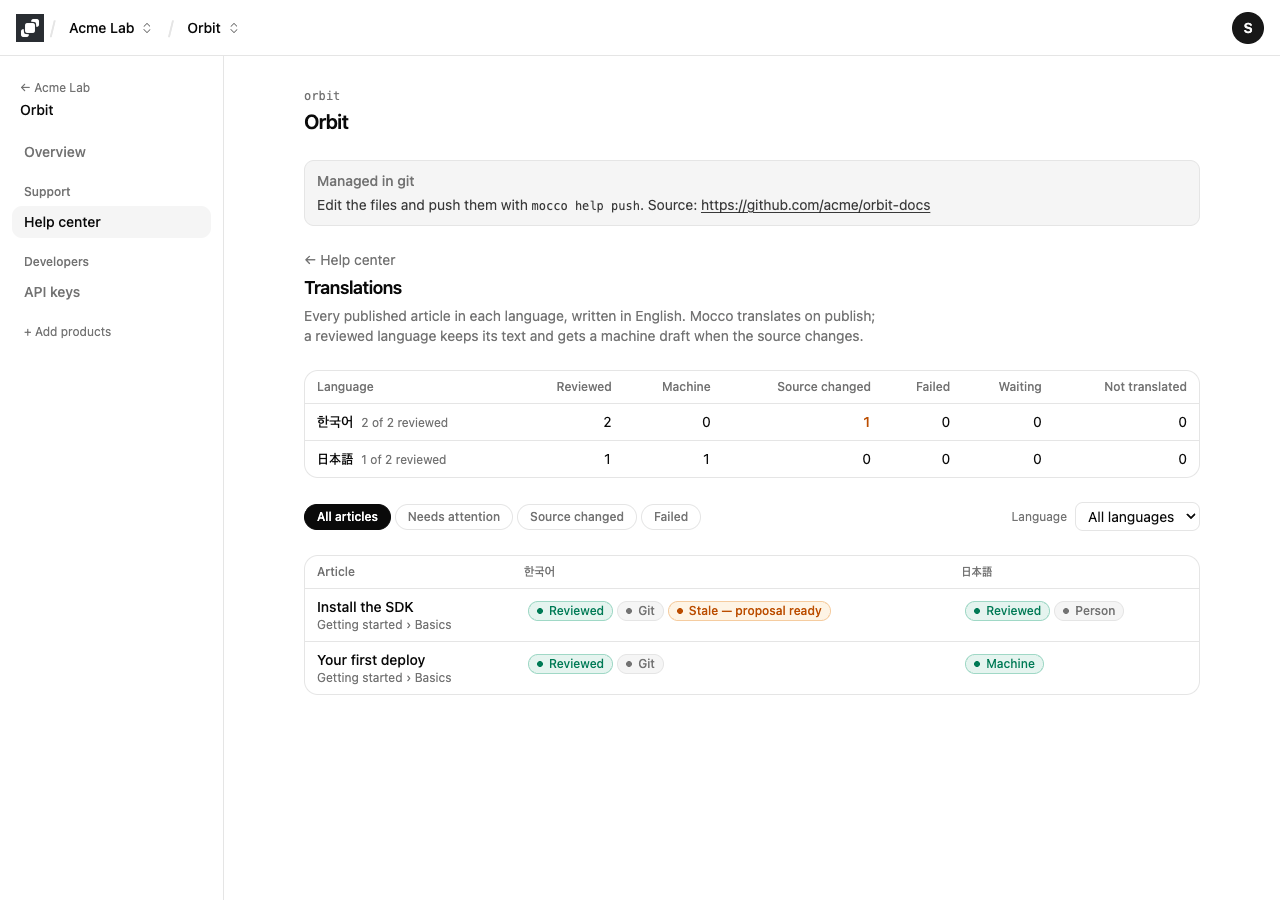
The Translations page shows where each translation came from: Git for a file you pushed, Person for text someone wrote in the console before the help center was managed, and Machine for Mocco's translation. A git translation whose source moved says Stale — proposal ready.
Release a help center from git
An owner or admin can give the help center back to the console. Open Help center, choose Release from git and confirm. The content stays as it is, and an agent can do the same with the mocco_help_site_release tool.
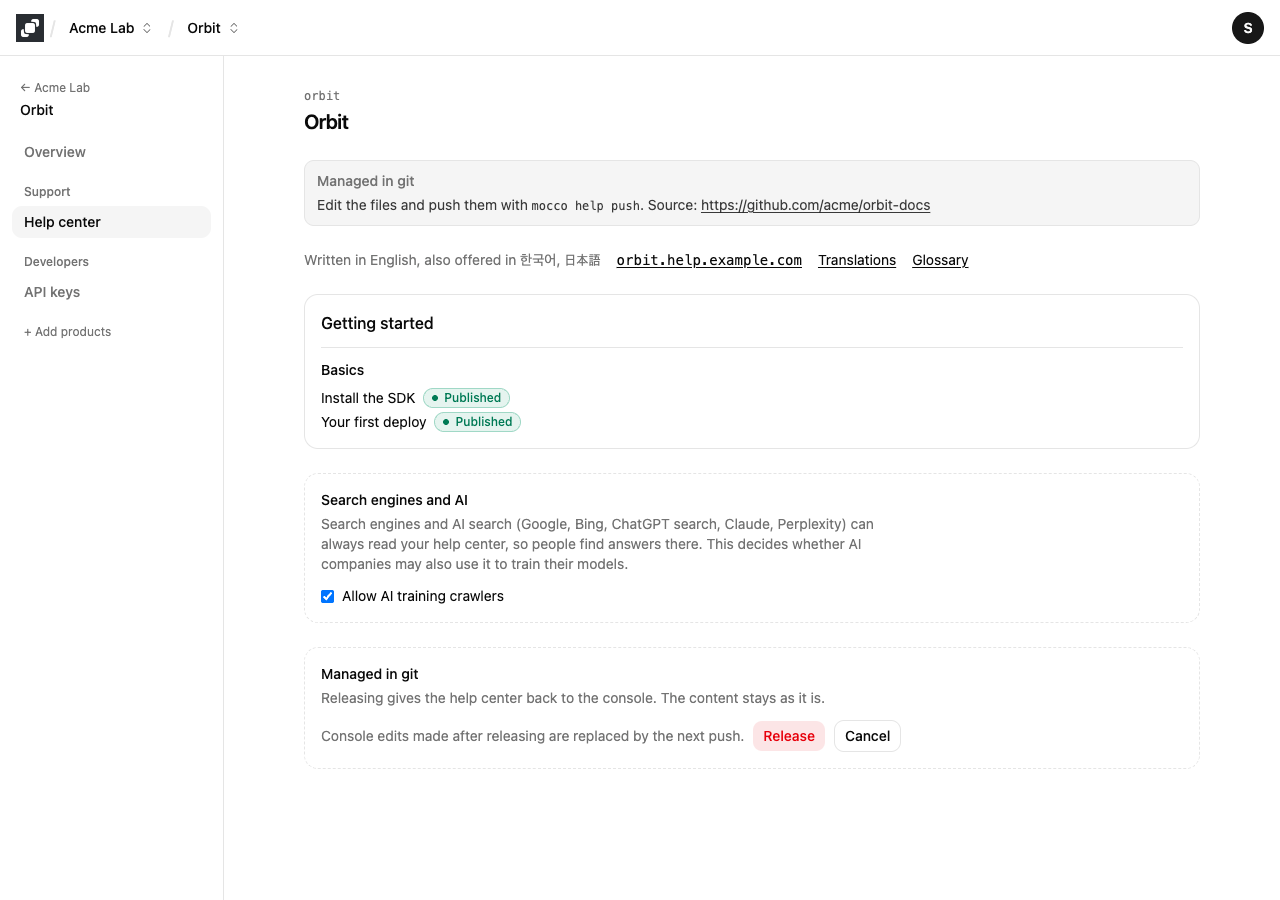
Console edits made after releasing are replaced by the next push, because a push takes the help center back. Release is an escape hatch, for example while you move the repository, not a way of working.